Buying a laptop is confusing because every brand promotes different things. One laptop says it has the latest processor. Another says it has more RAM. Another one focuses on battery life, display quality, AI features, graphics card, or slim design.
The real problem is that many buyers choose a laptop only by looking at price, processor name, or RAM number. Later, they may face problems like slow performance, poor battery backup, weak display brightness, heating, low storage, bad webcam quality, missing ports, or expensive repair costs.
A laptop is not something people change every few months. Students, office users, developers, creators, business users, and gamers usually buy a laptop for at least 3–5 years. Choosing the wrong laptop can waste money and affect daily work.
In this complete guide, you will learn what to check before buying a laptop, which specifications matter the most, which mistakes to avoid, and which laptop examples are suitable for different types of users.
Quick Summary
- Always choose a laptop based on your usage, not only on price.
- Processor, RAM, SSD, display, battery, and build quality matter the most.
- For students and office users, 16GB RAM and 512GB SSD is a safer choice in 2026.
- For gaming, video editing, 3D work, and AI tools, choose a laptop with a dedicated GPU.
- For long battery life, MacBook Air and efficient ultrabooks are usually better than gaming laptops.
- Do not buy a laptop only because it says “Core i7” or “Ryzen 7”; generation and power limit matter.
- Check webcam, keyboard, ports, warranty, service support, and upgrade options before buying.
Top Picks
- Lenovo IdeaPad Slim 5i – Best Overall
- Acer Aspire Lite Ryzen 5 – Best Budget
- ASUS TUF Gaming A15 – Best Performance
- Apple MacBook Air 13-inch M5 – Best Battery
- ASUS Vivobook 15 OLED – Best Value
Best Laptop Options To Understand Before Buying
1. Lenovo IdeaPad Slim 5i – Best Overall
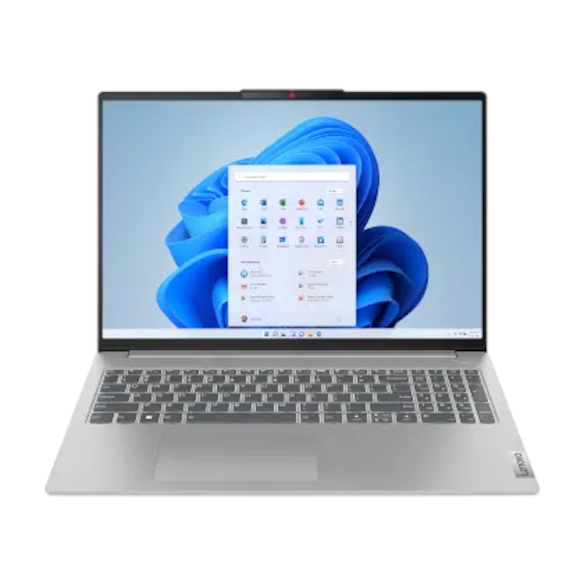
Key Specifications
- Processor: Intel Core Ultra 5 125H
- Display: 16-inch laptop category
- RAM: Usually available with 16GB variants
- Storage: SSD storage options
- Operating System: Windows 11
- Design: Thin and light productivity laptop
- Best For: Students, office users, multitasking, browsing, content work, and daily productivity
Lenovo IdeaPad Slim 5i is a strong overall laptop example because it gives a good balance of performance, portability, and daily usability. It is suitable for office work, study, browsing, multitasking, and normal creative tasks.
Key Features
The biggest advantage of this type of laptop is balance. It is not too heavy like a gaming laptop, and it is not too basic like entry-level laptops.
The Intel Core Ultra 5 processor is useful for modern productivity. It can handle Microsoft Office, Google Chrome, online meetings, PDF work, coding basics, video streaming, and light editing.
The larger 16-inch screen is helpful if you work with documents, spreadsheets, presentations, coding editors, or multiple browser tabs. A larger screen improves productivity because you do not need to zoom in and out all the time.
Real-World Performance
In real-world use, this laptop category is good for students, working professionals, teachers, business users, and normal home users.
It is smooth for daily tasks like browsing, video calls, writing documents, online classes, watching lectures, and light editing.
It is not designed for heavy gaming or professional 3D rendering. If your main work is gaming, animation, or high-end video editing, choose a dedicated graphics laptop instead.
Pros
- Good balance of performance and portability: It is powerful enough for normal users and still practical to carry.
- Large display for productivity: A 16-inch screen is better for multitasking, documents, and study work.
- Good for long-term daily use: With enough RAM and SSD storage, this type of laptop can last for years.
- Better than entry-level laptops: It gives a smoother experience than low-cost laptops with weak processors.
Cons
- Not ideal for heavy gaming: Integrated graphics are not enough for serious gaming.
- Price can be higher than basic laptops: Balanced laptops cost more than entry-level models.
- Exact specifications vary by variant: Always check RAM, SSD, display type, and ports before buying.
Best For: Lenovo IdeaPad Slim 5i is best for users who want a reliable all-round laptop for study, office work, multitasking, online meetings, and everyday productivity.
2. Acer Aspire Lite Ryzen 5 – Best Budget

Key Specifications
- Processor: AMD Ryzen 5 7430U
- RAM: 16GB DDR4
- Storage: 512GB SSD
- Display: 15.6-inch Full HD
- Graphics: AMD Radeon Graphics
- Weight: Around 1.59kg
- Webcam: 720p HD webcam
- Battery: 36Wh battery
- Best For: Budget buyers, students, online classes, office work, and basic multitasking
Acer Aspire Lite Ryzen 5 is a good budget laptop example because it gives practical specifications for normal users. It is useful for students, home users, and buyers who want a simple laptop for daily work.
Key Features
The best thing about this laptop is that it gives 16GB RAM and SSD storage at a budget-friendly level. This matters because many cheap laptops still come with 8GB RAM or slow storage.
The Ryzen 5 processor is good for normal daily tasks. It can handle browser work, online classes, office apps, YouTube, light coding, and basic photo editing.
The 15.6-inch screen is suitable for students and home users. It gives enough space for documents, videos, PDFs, and online classes.
Real-World Performance
For daily use, Acer Aspire Lite is practical. It is not a premium laptop, but it gives enough performance for most basic users.
Apps open faster because of the SSD. Multitasking is smoother because of 16GB RAM.
It is not made for heavy gaming, 4K editing, or advanced design work. But for college work, typing, browsing, video meetings, and basic productivity, it is a sensible choice.
Pros
- Good RAM and SSD combination: 16GB RAM and 512GB SSD is better than many cheap laptops.
- Budget-friendly for students: It is suitable for buyers who want useful specs without spending too much.
- Lightweight for a 15.6-inch laptop: Around 1.59kg is manageable for daily carrying.
- Good for basic office work: It can handle documents, browsing, emails, and meetings easily.
Cons
- Display quality is basic: Budget laptops usually do not offer premium colour accuracy or brightness.
- Battery is average: A 36Wh battery is fine for basic use but not ideal for full-day backup.
- Not for heavy gaming: Integrated graphics cannot match dedicated GPU laptops.
Best For: Acer Aspire Lite Ryzen 5 is best for students, home users, and budget buyers who need a laptop for online classes, browsing, assignments, office work, and entertainment.
3. ASUS TUF Gaming A15 – Best Performance

Key Specifications
- Processor: AMD Ryzen 7 7435HS
- Graphics: NVIDIA GeForce RTX 4050 6GB
- RAM: 16GB DDR5
- Storage: 512GB PCIe 4.0 NVMe SSD
- Display: 15.6-inch Full HD
- Refresh Rate: 144Hz
- Battery: 90Wh
- Weight: Around 2.20kg
- Best For: Gaming, video editing, 3D work, heavy multitasking, and performance users
ASUS TUF Gaming A15 is the best performance example because it has a powerful Ryzen 7 processor and dedicated RTX 4050 GPU. This makes it much stronger than normal thin-and-light laptops for gaming and graphics-heavy tasks.
Key Features
The biggest reason to buy a gaming laptop is performance. A dedicated GPU makes a huge difference for gaming, video editing, Blender, 3D modelling, AI workloads, and creative apps.
The 144Hz display is useful for gaming because motion looks smoother than a normal 60Hz screen.
The RTX 4050 GPU is also useful for creators. It can help in video editing, rendering, GPU acceleration, and some AI-based tools.
The 90Wh battery is large for a gaming laptop, but gaming laptops still drain faster than normal laptops during heavy use.
Real-World Performance
In real-world usage, ASUS TUF Gaming A15 is much faster than normal thin-and-light laptops for gaming and graphics-heavy tasks.
Games like GTA V, Valorant, BGMI emulator, Call of Duty, Forza, and many AAA titles can run much better on this type of laptop compared to laptops with only integrated graphics.
For video editing, this laptop can handle 1080p and some 4K editing better than budget laptops.
But it is heavier, louder, and less portable than normal laptops. The charger is also large.
Pros
- Excellent performance: Ryzen 7 and RTX 4050 make it suitable for gaming and heavy workloads.
- 144Hz display: Smooth refresh rate improves gaming and fast movement.
- Good upgrade options: Gaming laptops usually offer better RAM and storage upgrade flexibility.
- Strong cooling system: Performance laptops are designed to handle more heat than slim laptops.
Cons
- Heavy compared to normal laptops: Around 2.2kg is not ideal for daily college or office travel.
- Battery life is limited during gaming: Heavy gaming should be done while plugged in.
- Fans can get loud: During gaming or rendering, fan noise is normal.
Best For: ASUS TUF Gaming A15 is best for gamers, video editors, engineering students, 3D learners, and users who need strong performance.
4. Apple MacBook Air 13-inch M5 – Best Battery

Key Specifications
- Processor: Apple M5 chip
- CPU: 10-core CPU
- GPU: 8-core or 10-core GPU options
- RAM: Unified memory options
- Storage: Starts with 512GB SSD
- Display: 13.6-inch Liquid Retina display
- Camera: 12MP Center Stage camera
- Battery Life: Up to 18 hours
- Ports: Two Thunderbolt 4 ports and MagSafe charging
- Best For: Students, writers, office users, creators, travellers, and battery-focused buyers
Apple MacBook Air M5 is the best battery example because it focuses on efficiency, portability, and long daily usage. It is useful for people who want a silent, lightweight, premium laptop for study, work, writing, browsing, coding, and meetings.
Key Features
The biggest advantage of MacBook Air is battery life. It is designed for users who want a laptop that can last through classes, meetings, writing, browsing, and office work without always looking for a charger.
The fanless design also makes it silent. This is useful in libraries, classrooms, offices, and meetings.
The 12MP Center Stage camera is better than many budget Windows laptop webcams. This helps in video calls and online meetings.
The M5 chip is efficient and powerful for daily productivity, photo editing, coding, writing, and creative workflows.
Real-World Performance
In daily use, MacBook Air feels fast and smooth. It is excellent for browsing, writing, office work, video calls, coding, photo editing, and light video editing.
It is not the best choice for Windows-only software or high-end gaming. Many games and engineering tools may work better on Windows.
Battery backup is the biggest strength. For students and office users, it is one of the most dependable laptops for long usage.
Pros
- Excellent battery life: Up to 18 hours makes it ideal for travel, college, and office use.
- Very portable: It is thin, light, and easy to carry.
- Silent operation: Fanless design means no fan noise.
- Great webcam and speakers: Good for meetings, online classes, and media.
Cons
- Expensive compared to basic Windows laptops: It costs more than many student laptops.
- Limited ports: You may need adapters for USB-A, HDMI, or memory cards.
- Not ideal for Windows-only software: Some software may not work natively on macOS.
Best For: Apple MacBook Air M5 is best for users who want excellent battery life, portability, premium build, and smooth daily performance.
5. ASUS Vivobook 15 OLED – Best Value
Key Specifications
- Display: 15.6-inch OLED
- Resolution: Up to 2.8K
- Refresh Rate: Up to 120Hz
- Processor: Up to 13th Gen Intel Core i9
- RAM: Up to 16GB
- Storage: Up to 1TB SSD
- Connectivity: Wi-Fi 6E
- Features: Webcam shield, 180-degree hinge, ASUS IceCool thermal design
- Best For: Students, creators, movie watchers, office users, and display-focused buyers
ASUS Vivobook 15 OLED is a strong value option because it focuses on display quality and daily performance. It is useful for students, creators, movie watchers, office users, and buyers who want a better screen without buying a very expensive premium laptop.
Key Features
The main highlight is the OLED display. OLED screens look richer than normal LCD screens. Colours are more vibrant, blacks are deeper, and movies look better.
This is useful for students, creators, designers, and users who watch a lot of videos.
The 180-degree hinge is useful for sharing the screen during meetings or study sessions.
The webcam shield is also important for privacy. You can physically block the webcam when not in use.
Real-World Performance
In daily usage, ASUS Vivobook 15 OLED is excellent for media, browsing, documents, presentations, light editing, and online classes.
The OLED display improves the overall experience. If you spend long hours watching lectures, editing photos, or reading content, the screen quality makes a difference.
It is not a gaming laptop unless you choose a model with dedicated graphics. For normal use, integrated graphics are fine.
Pros
- Excellent display quality: OLED gives better colours, contrast, and viewing experience.
- Good value for students and creators: It offers premium screen quality without flagship pricing.
- Useful privacy feature: Webcam shield is practical for daily users.
- Good for entertainment: Movies, YouTube, and photos look better on OLED.
Cons
- OLED needs careful use: Long static images at high brightness can increase burn-in risk over time.
- Not always best for gaming: Most Vivobook models are productivity-focused, not gaming-focused.
- Variant confusion: ASUS sells many Vivobook models, so check exact specs carefully.
Best For: ASUS Vivobook 15 OLED is best for users who want a beautiful display, good productivity performance, and strong value.
Comparison Table
| Feature | Lenovo IdeaPad Slim 5i | Acer Aspire Lite Ryzen 5 | ASUS TUF Gaming A15 | Apple MacBook Air M5 | ASUS Vivobook 15 OLED |
|---|---|---|---|---|---|
| Best For | Daily productivity | Budget users | Gaming and heavy work | Battery and portability | Display and value |
| Performance | Good for daily productivity | Good for basic tasks | Best for gaming and heavy workloads | Excellent for daily use and creative tasks | Good for productivity and media |
| Battery | Good for normal use | Average | Large battery, but drains faster during gaming | Best battery life | Good for normal use |
| Best Buyer | Students and office users | Budget buyers | Gamers and creators | Travellers and professionals | Students and media users |
Category Winners
Price Winner: Acer Aspire Lite Ryzen 5
Acer Aspire Lite Ryzen 5 wins for budget buyers because it gives useful daily specifications like Ryzen 5, 16GB RAM, and 512GB SSD at a more affordable level.
Performance Winner: ASUS TUF Gaming A15
ASUS TUF Gaming A15 wins in performance because it includes a dedicated RTX 4050 GPU and Ryzen 7 processor. This makes it better for gaming, editing, 3D work, and demanding tasks.
Battery Winner: Apple MacBook Air M5
MacBook Air M5 wins in battery because it offers long battery life and excellent efficiency.
Camera Winner: Apple MacBook Air M5
MacBook Air M5 wins in webcam quality because it has a 12MP Center Stage camera, which is better for video calls than most 720p webcams.
Value Winner: ASUS Vivobook 15 OLED
ASUS Vivobook 15 OLED wins in value because it offers a premium OLED display and strong productivity features at a practical price.
Buying Guide
1. Processor
The processor is the brain of the laptop. It affects speed, multitasking, app loading, battery life, heating, and long-term performance.
For basic users, Intel Core i3, Ryzen 3, or entry-level chips are enough. For students and office users, Core i5, Core Ultra 5, Ryzen 5, or Apple M-series chips are better. For gaming and editing, choose Core i7, Core Ultra 7, Ryzen 7, or higher.
Do not check only “i5” or “i7.” Always check the generation and model number.
Related Guide: To understand laptop processors clearly, read our guide on i3 vs i5 vs i7 laptop processors.
2. RAM
RAM decides how many apps you can use smoothly at the same time.
In 2026, 8GB RAM is the minimum. 16GB RAM is recommended for students, office users, coding, multitasking, and long-term use.
For gaming, editing, and professional work, 16GB should be the minimum. 32GB is better for heavy users.
3. Storage
Choose SSD storage, not old HDD storage. SSD makes the laptop faster in booting, opening apps, copying files, and overall response.
512GB SSD is the safest minimum for most users. Choose 1TB if you store videos, games, projects, or large files.
4. Display
Display quality matters a lot because you look at the screen every day.
For normal use, Full HD is the minimum. For better quality, choose IPS or OLED. For creators, check colour accuracy. For gaming, check refresh rate.
OLED is best for movies and colours. IPS is safer for office and long static work.
5. Battery
Battery life depends on processor efficiency, battery size, display type, brightness, and workload.
Gaming laptops have large batteries but drain quickly under load. Thin laptops and MacBooks usually give better real-world battery life.
Related Guide: If battery backup is your top priority, check our list of laptops with best battery life in 2026.
6. Graphics Card
A dedicated GPU is important for gaming, 3D work, video editing, rendering, and AI tools.
For normal office and study use, integrated graphics are enough. For gaming, choose NVIDIA RTX 4050 or higher if your budget allows.
Related Guide: For gaming users, read our gaming laptop buying guide.
7. Keyboard And Touchpad
A laptop should have a comfortable keyboard and responsive touchpad. Students, writers, developers, and office users should never ignore keyboard quality.
Backlit keyboard is very useful for night work.
8. Ports
Check ports before buying. Many thin laptops have fewer ports.
Useful ports include USB-A, USB-C, HDMI, headphone jack, SD card reader, and charging port.
9. Webcam And Microphone
For online classes and meetings, webcam and microphone quality matter.
A 720p webcam is basic. A 1080p webcam or 12MP camera is much better.
10. Warranty And Service
Always check brand service support in your city. A good laptop is not only about specs. Repair support, warranty, and spare part availability matter.
Related Guides: You can also read our guides on best laptops for students, best laptops for coding, and best laptops under ₹60000.
Important Specs Explained
Processor
The processor controls performance. U-series processors usually focus on battery life. H-series processors focus on performance. Gaming laptops usually use H-series chips.
Battery
Battery is measured in watt-hours. Higher Wh usually means better backup, but processor efficiency matters too.
Display
Display quality includes resolution, panel type, brightness, refresh rate, and colour accuracy.
RAM
More RAM helps with multitasking. 16GB is the best safe choice for most users.
SSD
SSD is much faster than HDD. NVMe SSD is better than SATA SSD.
GPU
GPU matters for gaming, editing, 3D design, and AI tasks. It is not necessary for basic users.
Common Mistakes To Avoid
- Do not buy only because the laptop has Core i7.
- Do not buy 4GB RAM laptops in 2026.
- Do not buy HDD-only laptops.
- Do not ignore display quality.
- Do not buy a gaming laptop if you need long battery life.
- Do not ignore laptop weight.
- Do not forget to check ports.
- Do not buy without checking warranty and service support.
- Do not choose low storage if the laptop has no upgrade option.
Performance And Real-World Usage
Gaming Performance
For gaming, choose a laptop with a dedicated GPU. ASUS TUF Gaming A15 is a good example because it has RTX 4050 graphics and a 144Hz display.
Normal laptops can handle light games, but they are not suitable for heavy gaming.
Battery Usage
For battery life, MacBook Air M5 is the strongest option. Windows ultrabooks can also give good battery backup, but gaming laptops drain faster during heavy use.
If battery is your priority, avoid heavy gaming laptops.
Camera Usage
Laptop camera matters for Zoom, Google Meet, online classes, interviews, and office meetings.
MacBook Air M5 has a strong camera. Budget laptops usually have basic 720p webcams.
Daily Usage Experience
For daily use, choose a laptop with a good processor, 16GB RAM, SSD storage, comfortable keyboard, good display, and reliable battery.
Lenovo IdeaPad Slim 5i and ASUS Vivobook 15 OLED are good daily-use examples. Acer Aspire Lite is good for budget users.
Pros Of Buying The Right Laptop
- Better Productivity: A good laptop helps with study, work, meetings, coding, editing, and business tasks.
- Bigger Screen Than Phone Or Tablet: A laptop gives more space for multitasking, documents, and serious work.
- Long-Term Use: A well-chosen laptop can last 3–5 years or more.
- More Powerful Than Tablets: Laptops are better for coding, office work, editing, file management, and professional tools.
- Upgrade Options: Some laptops allow RAM and SSD upgrades, which can extend lifespan.
Cons And Problems To Watch For
- Good Laptops Are Expensive: A reliable laptop costs more than a basic tablet or phone.
- Repair Costs Can Be High: Display, motherboard, battery, and keyboard repairs can be expensive.
- Gaming Laptops Are Heavy: Gaming laptops offer performance but are not easy to carry daily.
- Battery Claims Can Be Misleading: Real battery life depends on usage, brightness, apps, and power mode.
- Too Many Variants: The same laptop name can have different processors, RAM, displays, and storage options.
Final Verdict
Best Overall Product: Lenovo IdeaPad Slim 5i is the best overall example for users who want a balanced laptop for study, office work, multitasking, and daily productivity.
Best Budget Product: Acer Aspire Lite Ryzen 5 is the best budget example because it offers useful specifications like Ryzen 5, 16GB RAM, and SSD storage.
Best Performance Product: ASUS TUF Gaming A15 is the best performance example because it has Ryzen 7, RTX 4050 graphics, 16GB DDR5 RAM, and a 144Hz display.
Best Battery Product: Apple MacBook Air M5 is the best battery example because it offers excellent battery life, silent performance, and strong portability.
Best Value Product: ASUS Vivobook 15 OLED is the best value example because it gives a premium OLED display and strong productivity features.
Who Should Buy
Students, office users, developers, creators, gamers, and business users should buy a laptop based on their actual work. Choose budget laptops for basic use, ultrabooks for portability, gaming laptops for performance, and MacBooks for battery and premium experience.
Who Should Avoid
Avoid buying a laptop if your work is only casual browsing, video watching, and basic reading. A tablet may be enough for very basic use. Also avoid expensive gaming laptops if you need portability and battery life more than performance.
FAQs
1. How much RAM is enough for a laptop in 2026?
8GB RAM is the minimum, but 16GB RAM is recommended for most users. Students, office workers, developers, and multitaskers should choose 16GB for smoother long-term performance.
2. Should I buy SSD or HDD laptop?
Always choose SSD. SSD laptops are much faster than HDD laptops. They boot faster, open apps faster, and feel smoother in daily use.
3. Which processor is best for students?
For students, Intel Core i5, Core Ultra 5, Ryzen 5, or Apple M-series chips are good choices. Avoid very old processors if you want the laptop to last for many years.
4. Do I need a graphics card in my laptop?
You need a dedicated graphics card only for gaming, video editing, 3D work, rendering, or AI tools. For normal browsing, office work, online classes, and movies, integrated graphics are enough.
5. Is a gaming laptop good for office work?
Yes, a gaming laptop can handle office work easily. But it is usually heavier, louder, and has lower battery life than normal laptops. Buy it only if you need performance.
6. Which laptop is best for battery life?
Apple MacBook Air is one of the best options for battery life. Windows ultrabooks can also be good, but gaming laptops usually have lower real-world battery backup.
7. What display should I choose?
Choose Full HD as the minimum. IPS is good for normal use. OLED is better for colours and entertainment. Gamers should check refresh rate, such as 120Hz or 144Hz.
Conclusion
Buying a laptop becomes easier when you know what to check. Do not buy only by looking at ads, discounts, RAM numbers, or processor names.
Check processor generation, RAM, SSD, display quality, battery life, GPU, keyboard, ports, webcam, warranty, weight, and upgrade options.
Choose Acer Aspire Lite Ryzen 5 if you want a budget laptop. Choose Lenovo IdeaPad Slim 5i if you want a balanced daily-use laptop. Choose ASUS TUF Gaming A15 if you want gaming and performance. Choose Apple MacBook Air M5 if battery life and portability matter most. Choose ASUS Vivobook 15 OLED if you want a beautiful display and strong value.
The best laptop is not the most expensive one. The best laptop is the one that matches your work, budget, and long-term usage.

No comments:
Post a Comment