Choosing the right RAM is one of the most confusing parts of buying a laptop, smartphone, tablet, or desktop PC. Many buyers think more RAM always means better performance, but that is not always true. A device with a weak processor and 16GB RAM can still feel slower than a well-optimized device with 8GB or 16GB RAM.
The problem is that brands use RAM numbers for marketing. You may see terms like 8GB RAM, 16GB RAM, 24GB RAM, 32GB RAM, virtual RAM, unified memory, DDR4, DDR5, LPDDR5X, and expandable RAM. For a normal buyer, this can be confusing.
This topic matters because RAM directly affects multitasking, app switching, browser tabs, gaming, video editing, coding, online classes, office work, and long-term performance. If you buy too little RAM, your device may become slow quickly. If you buy too much RAM without needing it, you may waste money.
In this guide, you will learn how much RAM you actually need in 2026, which RAM size is best for different users, what mistakes to avoid, and which product examples show practical RAM choices for real-world use.
Related Guide: If you are buying a laptop or phone, also read our storage guide for 64GB, 128GB, and 256GB.
Quick Summary
- 4GB RAM is too low for most laptops and modern devices in 2026.
- 8GB RAM is acceptable for basic use, but it is not ideal for long-term multitasking.
- 16GB RAM is the best choice for most students, office users, developers, and normal laptop buyers.
- 32GB RAM is better for gaming, video editing, coding with heavy tools, virtual machines, and creative work.
- 64GB RAM is only needed for professional editing, 3D work, AI workloads, large projects, and advanced multitasking.
- Virtual RAM is not equal to real physical RAM.
- Processor, SSD, graphics card, and software optimization matter along with RAM.
Top Picks
- Lenovo IdeaPad Slim 5i 16GB - Best Overall RAM Choice
- Acer Aspire Lite Ryzen 5 16GB - Best Budget RAM Choice
- ASUS TUF Gaming A15 16GB - Best Performance RAM Choice
- Apple MacBook Air M5 16GB - Best Battery And Efficiency Choice
- ASUS Vivobook 15 OLED 16GB - Best Value RAM Choice
Best Devices To Understand RAM Needs In 2026
1. Lenovo IdeaPad Slim 5i 16GB - Best Overall
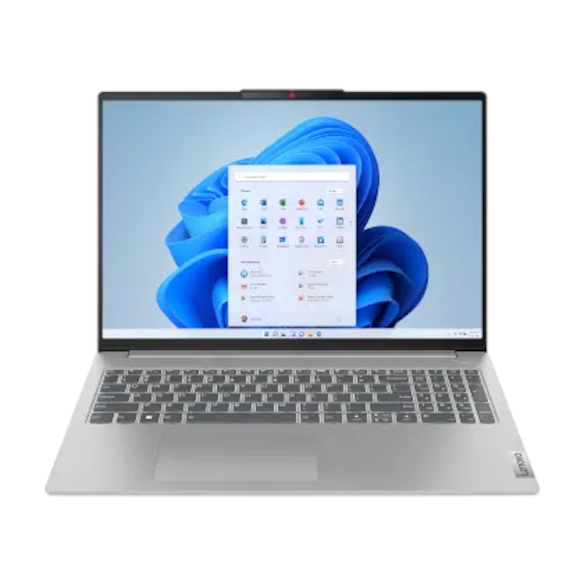
Key Specifications
- RAM: 16GB
- Processor: Intel Core Ultra series options depending on model
- Storage: SSD storage options
- Display: 14-inch or 16-inch variants depending on model
- Graphics: Integrated Intel graphics
- Operating System: Windows 11
- Best RAM Category: 16GB for balanced daily use
- Best For: Students, office users, multitasking, browsing, coding basics, and productivity
Key Features
Lenovo IdeaPad Slim 5i is a good example of the best RAM choice for most users. The main reason this laptop is a strong example is balance. A 16GB RAM laptop is enough for most real-world users in 2026.
You can open multiple browser tabs, use Microsoft Office, attend online meetings, manage PDFs, watch videos, and do light coding without feeling limited. This is the RAM size most users should choose if they want the laptop to last for several years.
A 16GB RAM laptop is also safer for users who do not want to upgrade quickly. It gives enough space for background apps, browser tabs, document work, and normal multitasking.
Real-World Performance
In daily use, a 16GB RAM laptop feels much smoother than an 8GB laptop when multitasking. You can keep browser tabs, documents, chat apps, video meetings, and background apps open without heavy slowdown.
For students, 16GB RAM is useful for online classes, research, assignments, presentations, and light coding. For office users, it is good for Excel, Google Workspace, CRM tools, video calls, emails, and browser-based work.
Pros
- Ideal RAM for most users: 16GB gives enough memory for multitasking without overspending.
- Good long-term choice: A 16GB laptop will usually age better than an 8GB laptop.
- Balanced performance: It is suitable for study, work, browsing, entertainment, and productivity.
- Better than entry-level laptops: It avoids the common slowdown problem found in low-RAM laptops.
Cons
- Not enough for very heavy workloads: Video editors, 3D artists, and virtual machine users may need 32GB or more.
- Integrated graphics limits gaming: RAM helps multitasking, but it does not replace a dedicated GPU.
- Exact specs vary by model: Always check processor, SSD, display, and RAM type before buying.
Best For: Lenovo IdeaPad Slim 5i with 16GB RAM is best for users who want a safe, balanced, and long-term laptop for daily productivity.
2. Acer Aspire Lite Ryzen 5 16GB - Best Budget

Key Specifications
- RAM: 16GB DDR4
- Processor: AMD Ryzen 5 7430U
- Storage: 512GB SSD
- Display: 15.6-inch Full HD
- Graphics: AMD Radeon Graphics
- Weight: Around 1.59kg
- Operating System: Windows 11
- Best RAM Category: Budget 16GB laptop
- Best For: Students, basic office work, online classes, and home users
Key Features
Acer Aspire Lite Ryzen 5 is a good budget example because it offers 16GB RAM and SSD storage in an affordable productivity laptop category. Many budget laptops still come with 8GB RAM, which can become limiting after a few years.
The Ryzen 5 processor is suitable for normal daily tasks. The SSD helps the laptop boot faster and open apps quickly. This combination is good for buyers who want a practical laptop without spending too much.
This laptop is not made for high-end gaming or professional editing, but it is a sensible choice for students and home users who want enough RAM for smooth basic work.
Real-World Performance
In real-world use, Acer Aspire Lite is good for online classes, browsing, typing, YouTube, PDFs, Excel, PowerPoint, and casual work.
The 16GB RAM helps when you keep many browser tabs open. It also helps students who use online learning apps, research websites, and document tools together.
Pros
- Good RAM for the price: 16GB RAM is a major advantage in the budget category.
- SSD storage improves speed: The laptop feels faster than older HDD laptops.
- Good for students: It handles online classes, assignments, and basic productivity well.
- Practical daily performance: It is enough for most home and office tasks.
Cons
- DDR4 RAM is older than DDR5: It is still useful, but DDR5 is faster in newer laptops.
- Display quality is basic: Budget laptops may not offer premium brightness or colour accuracy.
- Not suitable for heavy workloads: Gaming, 4K editing, and 3D work need stronger hardware.
Best For: Acer Aspire Lite Ryzen 5 16GB is best for budget buyers who want enough RAM for smooth daily use without paying premium prices.
3. ASUS TUF Gaming A15 16GB - Best Performance

Key Specifications
- RAM: 16GB DDR5 on many variants
- Processor: AMD Ryzen 7 or Ryzen 9 options depending on model
- Graphics: NVIDIA GeForce RTX graphics options depending on model
- Storage: PCIe NVMe SSD options
- Display: 15.6-inch Full HD options
- Refresh Rate: High-refresh display options depending on variant
- Best RAM Category: 16GB minimum for gaming, 32GB better for heavy users
- Best For: Gaming, video editing, 3D work, and performance users
Key Features
ASUS TUF Gaming A15 is a good example of a performance laptop where RAM is only one part of the full setup. For gaming and editing, RAM matters, but GPU and processor matter even more.
A 16GB DDR5 configuration is a good starting point for gaming in 2026. A dedicated NVIDIA GPU makes a big difference in games, video editing, rendering, and GPU-accelerated apps.
If you are a heavy user, you may want 32GB RAM, especially for advanced editing, Blender, Android Studio, Docker, virtual machines, or gaming while streaming.
Real-World Performance
For gaming, 16GB RAM is enough for most games when paired with a strong processor and GPU. Games like Valorant, GTA V, BGMI emulator, Call of Duty, and many AAA titles can run well when the full hardware setup is strong.
For video editing, 16GB is fine for 1080p editing and basic 4K projects. For heavy 4K editing, After Effects, Blender, or large creative projects, 32GB RAM is better.
For developers, 16GB is enough for normal coding. But Android Studio, Docker, virtual machines, and multiple servers may benefit from 32GB.
Pros
- DDR5 RAM is faster: DDR5 improves memory bandwidth compared to DDR4.
- Good gaming setup: A strong CPU and dedicated GPU make it suitable for performance users.
- 16GB is a strong starting point: Most gamers can start with 16GB and upgrade later if supported.
- Better cooling than thin laptops: Gaming laptops are designed to handle heavier workloads.
Cons
- 16GB may not be enough for advanced creators: Heavy editing and 3D work may need 32GB.
- Gaming laptops are heavier: Better performance usually means more weight.
- Battery drains faster under load: Gaming and rendering should usually be done while plugged in.
Best For: ASUS TUF Gaming A15 16GB is best for gamers, creators, engineering students, and users who need strong performance.
4. Apple MacBook Air M5 16GB - Best Battery

Key Specifications
- RAM Type: Unified memory
- Recommended RAM: 16GB unified memory for most users
- Processor: Apple M5 chip
- Storage: SSD storage options
- Display: Liquid Retina display
- Battery Life: Long battery life for video streaming and web use
- Webcam: Center Stage camera on current models
- Best RAM Category: Efficient 16GB unified memory
- Best For: Battery life, students, writers, office users, creators, and travel
Key Features
Apple MacBook Air is a good example where RAM works differently because Apple uses unified memory. Unified memory is shared between the CPU, GPU, and other parts of the system. Because of Apple silicon optimization, 16GB unified memory can feel very efficient for many users.
For students, writers, office workers, and light creators, 16GB unified memory is a strong choice. The biggest benefit is battery life. MacBook Air is designed for efficiency, so it can perform well while using less power.
One important point is that MacBook memory usually cannot be upgraded later. So if you are buying a MacBook for long-term use, choosing the right memory at the time of purchase is very important.
Real-World Performance
In daily use, MacBook Air with 16GB memory is smooth for browsing, writing, video calls, coding, photo editing, document work, and light video editing.
For heavy video editing, 3D work, or large professional projects, more memory may be needed. But for most users, 16GB is the sweet spot. Because MacBook Air is fanless, it is silent, making it excellent for classrooms, libraries, offices, and travel.
Pros
- Very efficient memory usage: Unified memory works well with Apple silicon.
- Excellent battery life: Great for users who work away from chargers.
- Smooth daily performance: Good for students, office users, and creators.
- Premium build quality: Useful for long-term daily use.
Cons
- Memory cannot be upgraded later: Choose RAM carefully before buying.
- Expensive upgrades: Higher memory options can cost a lot.
- Not ideal for Windows-only software: Some tools and games work better on Windows laptops.
Best For: Apple MacBook Air M5 16GB is best for users who want long battery life, premium build, silent performance, and smooth daily usage.
5. ASUS Vivobook 15 OLED 16GB - Best Value
Key Specifications
- RAM: Up to 16GB depending on model
- Processor: Intel Core options depending on variant
- Storage: SSD storage options
- Display: 15.6-inch OLED options
- Connectivity: Wi-Fi options depending on model
- Features: Webcam shield and 180-degree hinge on selected models
- Best RAM Category: 16GB for value productivity
- Best For: Students, creators, movie watchers, office users, and display-focused buyers
Key Features
ASUS Vivobook 15 OLED is a good value example because it combines practical RAM options with a high-quality OLED display. RAM helps performance, but the screen also affects your daily experience.
With 16GB RAM, this laptop can handle browsing, office work, online classes, content writing, light editing, and entertainment. The OLED display makes videos, images, and presentations look better than normal LCD panels.
This type of laptop is useful for users who want a better screen for videos, presentations, design previews, and casual creative work without buying a heavy gaming laptop.
Real-World Performance
For students and creators, 16GB RAM is enough for daily productivity. You can keep multiple tabs open, work on documents, watch videos, edit light photos, and attend meetings smoothly.
For heavy creative work, the exact processor and GPU matter. If you choose a lower-end variant, it may not be suitable for advanced editing even if it has 16GB RAM.
Pros
- Great display quality: OLED gives better colours, contrast, and viewing experience.
- 16GB RAM is enough for most users: Good for multitasking and long-term use.
- Good value for media users: Excellent for YouTube, movies, design previews, and presentations.
- Useful privacy feature: Webcam shield helps protect privacy on supported models.
Cons
- OLED needs careful use: Avoid keeping static images at high brightness for very long periods.
- Not always a gaming laptop: Most Vivobook models are productivity-focused.
- Many variants exist: Always check exact RAM, processor, storage, and display before buying.
Best For: ASUS Vivobook 15 OLED 16GB is best for users who want a value laptop with good RAM and an excellent display.
Comparison Table
| Feature | Lenovo IdeaPad Slim 5i | Acer Aspire Lite Ryzen 5 | ASUS TUF Gaming A15 | Apple MacBook Air M5 | ASUS Vivobook 15 OLED |
|---|---|---|---|---|---|
| Best For | Overall daily use | Budget users | Gaming and performance | Battery and portability | Display and value |
| Recommended RAM | 16GB | 16GB | 16GB minimum, 32GB for heavy use | 16GB unified memory | 16GB |
| Performance | Good for productivity | Good for basic work | Strong for gaming and editing | Smooth and efficient | Good for daily productivity |
| Battery | Good for normal use | Good for basic use | Strong battery size, drains faster under load | Best battery efficiency | Good depending on variant |
| Main Advantage | Balanced choice | Affordable 16GB option | Dedicated GPU options | Silent and efficient | OLED display |
Category Winners
Price Winner: Acer Aspire Lite Ryzen 5 16GB
Acer Aspire Lite wins for price because it gives 16GB RAM and SSD storage in a budget-friendly laptop category.
Performance Winner: ASUS TUF Gaming A15 16GB
ASUS TUF Gaming A15 wins in performance because it offers gaming-focused hardware, stronger cooling, and dedicated GPU options.
Battery Winner: Apple MacBook Air M5 16GB
MacBook Air wins in battery because Apple silicon and unified memory help deliver excellent efficiency for daily use.
Camera Winner: Apple MacBook Air M5 16GB
MacBook Air wins the webcam category because current models offer a better video calling experience than many basic laptop webcams.
Value Winner: ASUS Vivobook 15 OLED 16GB
ASUS Vivobook 15 OLED wins value because it combines practical RAM with a better display experience.
Buying Guide
1. 4GB RAM
Avoid 4GB RAM laptops in 2026 unless your usage is extremely basic. It may handle simple browsing and typing, but it will feel slow with modern apps.
2. 8GB RAM
8GB RAM is acceptable for basic users. It is enough for browsing, YouTube, email, online classes, and simple office work.
But if you keep many tabs open or want long-term use, 8GB may feel limited. For a new laptop, 16GB is usually a better choice if your budget allows.
3. 16GB RAM
16GB RAM is the best choice for most people. It is suitable for students, office workers, developers, normal creators, multitaskers, and long-term buyers.
This is the safest RAM size in 2026 because it gives enough memory for browser tabs, documents, video calls, coding basics, light editing, and daily multitasking.
4. 32GB RAM
32GB RAM is best for heavy users. Choose it if you do video editing, coding with Docker, Android Studio, virtual machines, gaming while streaming, 3D work, or large Excel files.
If you want a laptop for development, creative work, or long-term performance, 32GB can be a smart upgrade.
5. 64GB RAM
64GB RAM is for professionals. It is useful for 8K editing, large development environments, AI tools, 3D rendering, huge datasets, and advanced multitasking.
Most normal users do not need 64GB. If your daily work is browsing, YouTube, office work, online classes, and normal apps, 64GB will usually be unnecessary.
Important Specs Explained
RAM Type
DDR4 is older but still useful. DDR5 is faster and more modern. LPDDR5 and LPDDR5X are common in thin laptops and offer good efficiency.
Physical RAM vs Virtual RAM
Physical RAM is real memory installed in the device. Virtual RAM uses storage as temporary memory. Virtual RAM is slower and should not be treated as real RAM.
Processor
A good processor is as important as RAM. A weak processor with 16GB RAM can still feel slow. Always check processor generation and performance before buying.
SSD
SSD storage improves speed. A laptop with SSD and 16GB RAM feels much faster than an HDD laptop with the same RAM.
Graphics Card
For gaming, editing, 3D work, and AI workloads, the GPU matters a lot. RAM alone cannot make a laptop good for gaming or rendering.
Common Mistakes To Avoid
- Do not buy 4GB RAM laptops in 2026.
- Do not think virtual RAM equals real RAM.
- Do not buy only by looking at RAM.
- Do not ignore processor generation.
- Do not ignore SSD storage.
- Do not buy non-upgradeable 8GB laptops for long-term use.
- Do not choose 32GB RAM if you only browse and watch videos.
- Do not buy a gaming laptop only because it has more RAM; check the GPU first.
- Do not forget that many thin laptops and MacBooks cannot be upgraded later.
Performance And Real-World Usage
Gaming Performance
For gaming, 16GB RAM is the current sweet spot. Most games run well with 16GB RAM if the processor and GPU are strong.
For gaming plus streaming, 32GB RAM is better. RAM helps with background apps and multitasking, but the GPU is more important for graphics performance.
Battery Usage
More RAM can use slightly more power, but battery life depends more on processor, display, battery size, and software optimization.
MacBook Air is efficient because of Apple silicon and unified memory. Gaming laptops use more power because of dedicated GPUs and high-performance processors.
Camera And Video Calls
RAM does not directly improve camera quality. But enough RAM helps during video calls when you are also sharing your screen, using browser tabs, and running other apps.
For online meetings, webcam quality and microphone quality matter more than RAM.
Daily Usage Experience
For daily use, 16GB RAM gives the best experience. You can keep apps open, switch between tasks smoothly, and avoid slowdown.
8GB is okay for light users, but 16GB is better for future-proofing. If you want your laptop to stay smooth for years, 16GB is the safer option.
Pros Of Having Enough RAM
- Better multitasking: More RAM allows you to keep more apps and browser tabs open without slowdown.
- Longer laptop life: A laptop with 16GB RAM or more will usually stay useful longer than an 8GB laptop.
- Better creative work: Photo editing, video editing, coding, and design tools run smoother with more RAM.
- Improved browser experience: Chrome, Edge, and other browsers use a lot of memory. More RAM helps with many tabs.
- Better gaming support: Modern games run better with 16GB RAM, especially when background apps are open.
Cons Of Buying Too Much RAM
- Higher price: Higher RAM variants are usually more expensive.
- Not always needed: Basic users do not need 32GB or 64GB RAM.
- RAM alone does not make a device fast: Processor, SSD, GPU, and software also matter.
- Some RAM cannot be upgraded: Many thin laptops and MacBooks have soldered memory.
- Wrong RAM choice can waste money: Buying too little RAM causes slow performance. Buying too much RAM without needing it wastes money.
Final Verdict
Best Overall RAM Choice: 16GB RAM is the best overall choice in 2026. It is enough for students, office users, developers, multitaskers, and most laptop buyers.
Best Budget RAM Choice: 8GB RAM is acceptable only for very basic users. If your budget allows, choose 16GB.
Best Performance RAM Choice: 32GB RAM is best for gaming plus streaming, video editing, virtual machines, professional coding, and heavy multitasking.
Best Battery RAM Choice: 16GB unified memory on MacBook Air is a strong battery-focused option because it balances performance and efficiency.
Best Professional RAM Choice: 64GB RAM is useful only for advanced workloads like 8K editing, large 3D projects, AI workloads, and heavy professional multitasking.
Who Should Buy 16GB RAM?
- Students who attend online classes and work on assignments.
- Office users who use browser tabs, documents, email, and video calls.
- Developers who do normal coding and web development.
- Content writers, teachers, and business users.
- Users who want a safe long-term RAM choice.
Who Should Buy 32GB RAM?
- Gamers who stream or record gameplay.
- Video editors working with 4K projects.
- Programmers using Docker, Android Studio, or virtual machines.
- Designers, engineers, and creators using heavy tools.
- Users who want stronger long-term performance.
Who Should Avoid High RAM?
- Users who only browse the web and watch YouTube.
- Users who mainly use WhatsApp Web, email, and simple apps.
- Budget buyers who do not run heavy software.
- Casual users who do not edit videos, play heavy games, or code with large tools.
- Users who can spend the extra money on a better processor or SSD instead.
FAQs
1. Is 8GB RAM enough in 2026?
8GB RAM is enough only for basic use like browsing, YouTube, email, online classes, and simple office work. For long-term use, 16GB RAM is better.
2. Is 16GB RAM enough for students?
Yes, 16GB RAM is ideal for students. It is good for online classes, research, assignments, presentations, coding basics, and multitasking.
3. Do gamers need 16GB or 32GB RAM?
Most gamers can use 16GB RAM. But if you stream, record gameplay, use Discord, keep browser tabs open, or play heavy games, 32GB RAM is better.
4. Is virtual RAM useful?
Virtual RAM can help in some cases, but it is not equal to real physical RAM. Real RAM is much faster and more important.
5. Is 32GB RAM overkill?
For basic users, yes. For video editors, developers, gamers, 3D artists, and virtual machine users, 32GB RAM is useful.
6. Should I buy DDR4 or DDR5 RAM?
DDR5 is better and more modern. But a good DDR4 laptop can still be useful if the price is right. Do not judge only by RAM type; check processor and SSD too.
7. Can I upgrade RAM later?
Some laptops allow RAM upgrades, but many thin laptops and MacBooks do not. Always check upgrade support before buying.
Conclusion
RAM is important, but it is not the only thing that makes a device fast. For most people in 2026, 16GB RAM is the best and safest choice. It gives smooth multitasking, better long-term performance, and enough power for students, office users, developers, and normal creators.
Choose 8GB RAM only if your usage is very basic. Choose 16GB RAM for the best overall experience. Choose 32GB RAM for gaming, editing, coding, and heavy multitasking. Choose 64GB RAM only for professional workloads.
Before buying any device, check RAM, processor, SSD, GPU, display, battery, upgrade options, and real-world reviews. The right RAM choice can make your laptop or device feel faster, last longer, and give better value for money.

No comments:
Post a Comment