Buying the right student accessories can save time, improve focus, and make daily study life much easier. Many students buy a phone, tablet, or laptop, but they ignore the small accessories that actually improve the full experience.
The problem is that students often waste money on random gadgets. Some earbuds have poor mic quality, some power banks charge slowly, some cheap mice stop working quickly, and some storage devices are too slow for file transfer. A bad accessory may look cheap at first, but it can create daily frustration.
Students need a practical setup for online classes, notes, assignments, video calls, PDFs, file sharing, travel, presentations, and entertainment. The right accessories can make a budget phone, tablet, or laptop feel much more useful.
In this guide, you will learn about the best accessories for students, which product is best for online classes, which one is best for budget note-taking, which one is best for file transfer, which accessory gives the best battery backup, and what mistakes to avoid before buying.
Note: Prices, offers, and availability may change during sales. Always check the latest price and product details before ordering.
Quick Summary
- boAt Airdopes 141 Gen 2 is the best overall student accessory because it is useful for online classes, calls, music, videos, and travel.
- Portronics Ruffpad 15M is the best budget accessory for students who want reusable digital note-taking without wasting paper.
- SanDisk Ultra Dual Drive Go 128GB is the best performance accessory for fast file transfer between phone, tablet, and laptop.
- Ambrane PowerLit 10000mAh is the best battery accessory because it gives portable backup charging during college, travel, and emergencies.
- Portronics Toad One is the best value accessory for students using laptops, tablets, or desktop setups.
- Students should focus on practical accessories, not only fancy gadgets.
- A good student setup should include audio, storage, battery backup, note-taking, and productivity accessories.
Top Picks
- boAt Airdopes 141 Gen 2 – Best Overall
- Portronics Ruffpad 15M – Best Budget
- SanDisk Ultra Dual Drive Go 128GB – Best Performance
- Ambrane PowerLit 10000mAh – Best Battery
- Portronics Toad One – Best Value
Best Accessories For Students
1. boAt Airdopes 141 Gen 2 – Best Overall
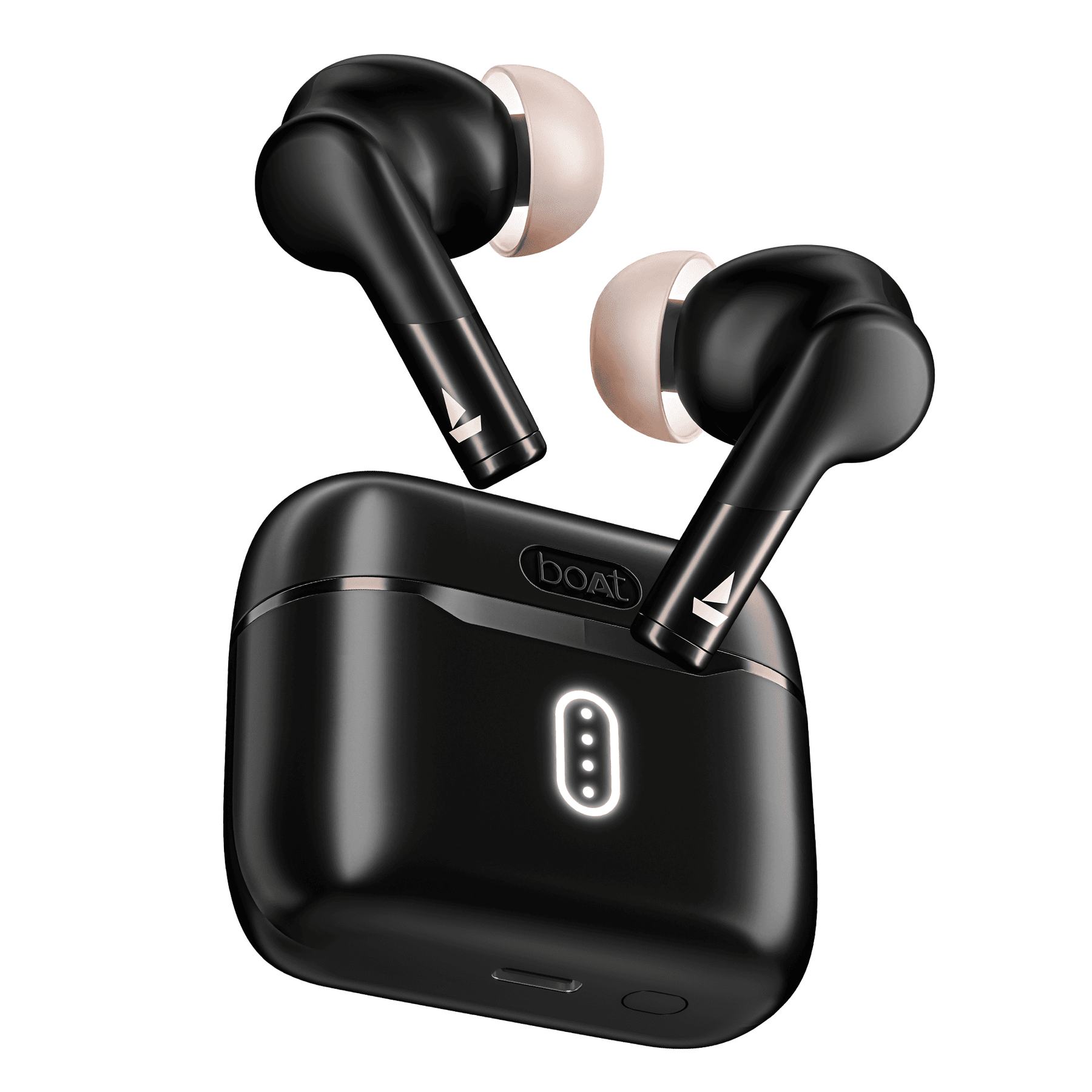
Key Specifications
- Product Type: True wireless earbuds
- Bluetooth: Bluetooth v5.4
- Driver Size: 10mm x 2
- Playback Time: Up to 48 hours with case
- Low Latency: BEAST Mode with 65ms low latency
- Microphones: 4 mics with ENx technology
- Water Resistance: IPX4
- Charging: Type-C charging
- Best For: Online classes, calls, music, YouTube, gaming, and travel
boAt Airdopes 141 Gen 2 is the best overall accessory for students because audio is needed almost every day. Students use earbuds for online classes, lectures, Zoom calls, Google Meet, YouTube lessons, music, podcasts, and travel.
Key Features
The biggest advantage of these earbuds is versatility. They are useful for study, entertainment, calls, and casual gaming.
The 4-mic ENx setup helps during calls and online classes. It reduces some background noise so your voice sounds clearer.
The 65ms BEAST Mode is useful for students who play casual games or watch videos. It reduces audio delay compared to normal Bluetooth mode.
The long battery backup is also important. Students do not want earbuds that need charging every few hours.
Real-World Performance
In daily use, boAt Airdopes 141 Gen 2 is good for lectures, meetings, music, and YouTube. The sound is bass-friendly, so it works well for songs and videos.
For online classes, the mic quality is good for the price. It is not equal to professional microphones, but it is enough for normal student use.
For gaming, BEAST Mode helps reduce delay. It is good for casual gaming, but serious competitive gamers may still prefer wired earphones or gaming earbuds.
Pros
- Useful every day: Students can use it for classes, calls, music, videos, and travel.
- Long battery life: Up to 48 hours total playback reduces charging stress.
- Good calling support: 4 mics with ENx make it better for online classes and meetings.
- Low-latency mode: BEAST Mode is useful for videos and casual gaming.
Cons
- No premium ANC: It improves calls, but it is not a high-end noise-cancelling earbud.
- Fit depends on ear shape: Some users may need to try different ear tips.
- Not for professional audio editing: It is good for students, but not for studio-level sound work.
Best For: boAt Airdopes 141 Gen 2 is best for students who need one affordable audio accessory for classes, calls, entertainment, and daily use.
2. Portronics Ruffpad 15M – Best Budget
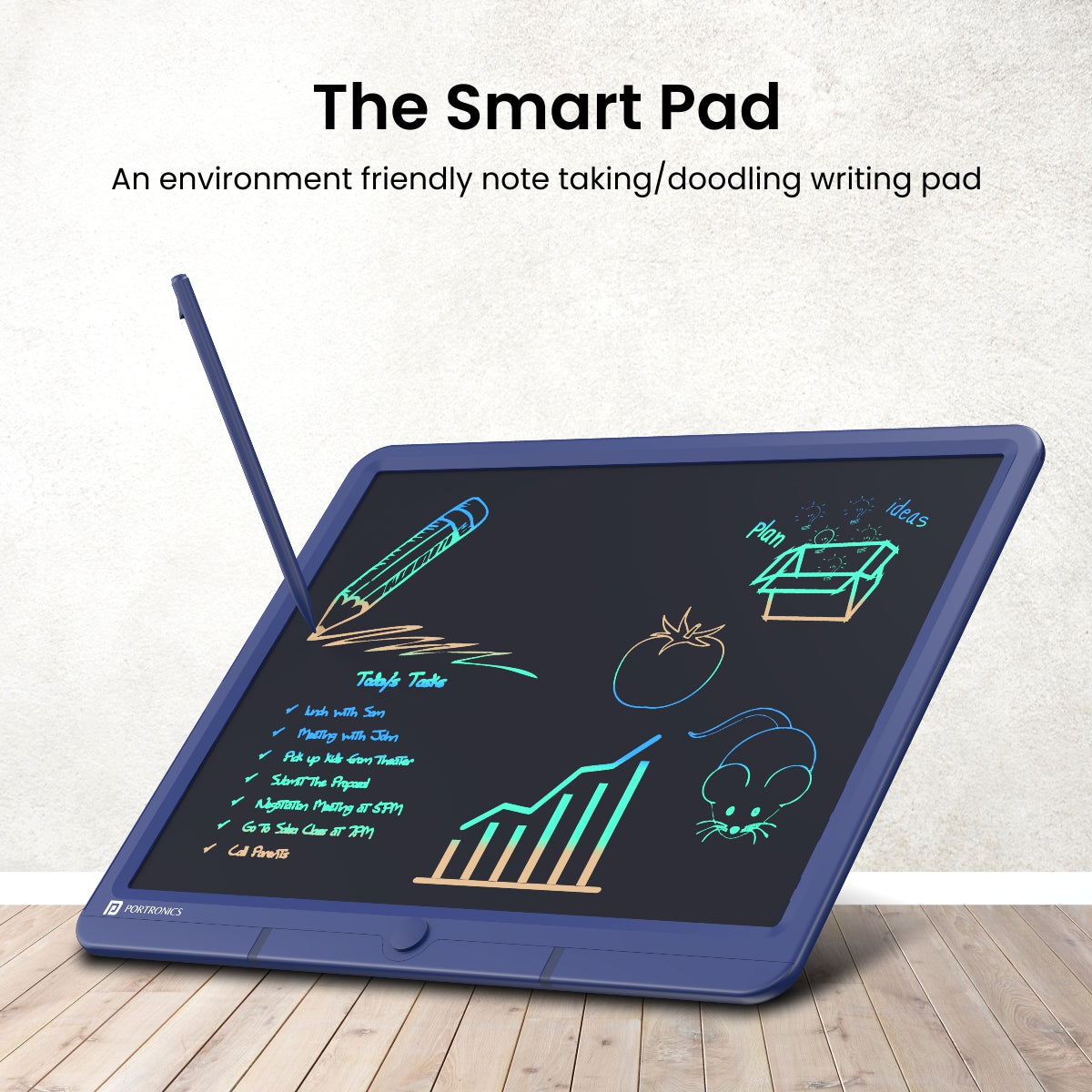
Key Specifications
- Product Type: LCD writing pad
- Display: 15-inch LCD display
- Colour: Blue
- Writing Pen: 3D pen included
- Erase Function: One-tap erase
- Body: Plastic body
- Battery: Long-life battery
- Warranty: 12 months
- Best For: Rough notes, formulas, diagrams, practice, and paperless study
Portronics Ruffpad 15M is the best budget accessory because it helps students write and practice without wasting paper. It is useful for rough work, calculations, formulas, diagrams, brainstorming, and quick notes.
Key Features
The main benefit is reusable writing. Students can use it for maths practice, rough calculations, diagrams, formulas, brainstorming, and quick notes.
The 15-inch screen gives more writing space than small 8.5-inch pads. This is useful for students who solve long problems or draw diagrams.
The one-tap erase button saves time. Instead of using paper again and again, you can write, erase, and reuse.
The app support is useful if you want to save notes or doodles on your phone, depending on the supported model and setup.
Real-World Performance
In real-world use, Ruffpad 15M is useful for students preparing for exams. It is especially good for maths, physics, chemistry, coding logic, flowcharts, diagrams, and rough planning.
It is not a replacement for a tablet like iPad or Android tablet. You cannot install apps, browse, or take advanced digital notes. But for rough writing, it is very useful and affordable.
Pros
- Saves paper: Good for students who write rough notes daily.
- Large writing area: The 15-inch screen is better than small writing pads.
- Simple to use: Write with the pen and erase with one button.
- Good for practice: Useful for formulas, diagrams, calculations, and exam preparation.
Cons
- Not a real tablet: It cannot run apps or store notes like a full tablet.
- No backlight: You need proper room lighting.
- Basic writing experience: It is good for rough work, not professional digital note-taking.
Best For: Portronics Ruffpad 15M is best for students who want an affordable paperless writing pad for practice and rough notes.
3. SanDisk Ultra Dual Drive Go 128GB – Best Performance

Key Specifications
- Product Type: Dual USB flash drive
- Capacity: 128GB
- Connectors: USB Type-C and USB Type-A
- Interface: USB 3.2 Gen 1
- Read Speed: Up to 400MB/s for 128GB model
- Dimensions: 44.45mm x 12.19mm x 8.64mm
- Weight: 3.7g
- Warranty: 5-year limited warranty
- Best For: File transfer, backups, phone storage, laptop storage, and assignments
SanDisk Ultra Dual Drive Go 128GB is the best performance accessory for students because it solves a common problem: moving files between phone, tablet, and laptop.
Key Features
The biggest advantage is dual connectivity. One side works with USB Type-C devices, and the other works with USB Type-A laptops or desktops.
This is useful for students who move PDFs, assignments, videos, photos, presentations, notes, project files, and documents between devices.
The 128GB capacity is practical for most students. It gives enough space for assignments, PDFs, lectures, and backup files.
The swivel design helps protect the connectors when you carry it in a bag or pocket.
Real-World Performance
In daily use, this drive is very useful for college and school work. You can move files from phone to laptop without using cables or cloud storage.
It is also useful when internet is slow. Instead of uploading large files to cloud storage, you can transfer them directly.
The speed depends on your device, port, and file type. Large single files usually transfer faster than many small files.
Pros
- Dual USB-C and USB-A design: Works with many phones, tablets, laptops, and desktops.
- Good read speed: Up to 400MB/s read speed is useful for fast file access.
- Portable and lightweight: Easy to carry in a pocket or pencil pouch.
- Useful for backups: Good for storing assignments, PDFs, and important files.
Cons
- Write speed can vary: Read speed is high, but write speed depends on file type and device.
- Needs OTG support on phones: Your phone must support USB OTG.
- Small size can be lost easily: Keep it attached to a keychain or pouch.
Best For: SanDisk Ultra Dual Drive Go 128GB is best for students who regularly transfer files between phone, tablet, laptop, and college systems.
4. Ambrane PowerLit 10000mAh – Best Battery

Key Specifications
- Product Type: Power bank
- Capacity: 10000mAh lithium polymer battery
- Fast Charging Output: 22.5W
- Input: 18W Type-C input
- Ports: 1 USB output + 1 Type-C output
- Charging Support: Charge two devices at the same time
- Protection: Multi-layer chipset protection
- Warranty: 180 days
- Best For: Travel, college, emergency charging, phone charging, and earbuds charging
Ambrane PowerLit 10000mAh is the best battery accessory for students. It is useful for long college days, travel, coaching classes, libraries, hostels, and emergency charging.
Key Features
The biggest advantage is emergency charging. Students spend long hours in college, coaching classes, libraries, hostels, and travel. A power bank helps when the phone battery gets low.
The 10000mAh capacity is practical because it is lighter than larger 20000mAh power banks. It is easier to carry daily.
The 22.5W output is useful for faster top-ups. It is not laptop charging, but it is good for phones, earbuds, and small USB-powered devices.
The dual output ports let you charge two devices at once.
Real-World Performance
In real life, Ambrane PowerLit is useful for students who use mobile data, maps, online payments, camera, hotspot, and video calls.
It can charge your phone during travel or college breaks. It can also charge earbuds when the case battery is low.
For tablets or laptops, this power bank is limited. If you want to charge tablets multiple times or charge laptops, choose a higher-capacity power bank.
Pros
- Compact and easy to carry: Good for students who travel daily.
- 22.5W fast charging: Better than basic slow power banks.
- Dual output ports: Can charge two devices together.
- Useful for emergencies: Reduces battery anxiety during long days.
Cons
- Not enough for laptops: It is mainly for phones and small devices.
- 10000mAh may not be enough for heavy travellers: A 20000mAh power bank is better for long trips.
- Fast charging depends on device and cable: Use a good cable for best results.
Best For: Ambrane PowerLit 10000mAh is best for students who need backup charging for phone, earbuds, and small devices.
5. Portronics Toad One – Best Value

Key Specifications
- Product Type: Rechargeable wireless mouse
- Connectivity: Bluetooth + 2.4GHz receiver
- DPI: Adjustable 1000 / 1200 / 1600 DPI
- Buttons: 6-button design
- Charging: USB Type-C
- Battery: Built-in rechargeable battery
- Weight: 60g
- Warranty: 12 months
- Best For: Laptop users, tablet users, presentations, browsing, and productivity
Portronics Toad One is the best value accessory because it improves laptop and tablet productivity at a low cost. A mouse is simple, but it can make studying faster.
Key Features
Using a touchpad for long assignments, browsing, editing, or presentations can feel slow. A wireless mouse makes navigation faster and more comfortable.
Toad One supports Bluetooth and 2.4GHz receiver mode. This means students can use it with laptops, tablets, and supported devices.
The rechargeable battery saves money because you do not need to buy extra AA or AAA cells.
Adjustable DPI helps control pointer speed. This is useful for editing, browsing, and presentations.
Real-World Performance
In daily use, Toad One is good for students who work on assignments, slides, spreadsheets, Canva, browsing, and online classes.
It is also useful for tablet users who connect a keyboard and mouse for a laptop-like setup.
It is not a professional gaming mouse, but it is good for casual use and productivity.
Pros
- Good value for money: It improves daily productivity without costing much.
- Dual connectivity: Bluetooth and 2.4GHz receiver make it flexible.
- Rechargeable battery: No need to buy separate batteries.
- Lightweight design: Easy to carry in a laptop bag.
Cons
- Not for serious gaming: Casual gaming is fine, but serious gamers need a proper gaming mouse.
- Small size may not suit everyone: Users with large hands may prefer a bigger mouse.
- RGB may not be useful for all students: Some users may prefer a simple design.
Best For: Portronics Toad One is best for students who use laptops, tablets, or desktop setups for assignments, browsing, presentations, and productivity.
Comparison Table
| Feature | boAt Airdopes 141 Gen 2 | Portronics Ruffpad 15M | SanDisk Ultra Dual Drive Go 128GB | Ambrane PowerLit 10000mAh | Portronics Toad One |
|---|---|---|---|---|---|
| Best For | Online classes and calls | Rough notes and practice | File transfer and storage | Backup charging | Productivity |
| Performance | Best for audio, calls, classes, and casual gaming | Best for reusable writing | Best for file transfer and storage | Best for charging backup | Best for laptop and tablet control |
| Battery | Up to 48 hours with case | Long-life battery | No battery required | 10000mAh power bank | Rechargeable battery |
| Best Buyer | Students attending online classes | Students writing rough notes | Students transferring files | Students travelling daily | Laptop and tablet users |
Category Winners
Price Winner: Portronics Ruffpad 15M
Portronics Ruffpad 15M wins for budget note-taking because it is useful, reusable, and affordable for students who write a lot.
Performance Winner: SanDisk Ultra Dual Drive Go 128GB
SanDisk Ultra Dual Drive Go wins performance because it offers fast file transfer and dual USB-C/USB-A connectivity.
Battery Winner: Ambrane PowerLit 10000mAh
Ambrane PowerLit wins battery because it provides emergency charging for phones, earbuds, and small devices.
Camera Winner: No Accessory Wins
These accessories do not have cameras. For camera use, students should rely on their smartphone, tablet, or webcam.
Best Overall Winner: boAt Airdopes 141 Gen 2
boAt Airdopes 141 Gen 2 wins overall because students use audio almost every day for classes, calls, videos, music, and travel.
Buying Guide
1. Daily Use
Buy accessories based on your daily routine. If you attend online classes, earbuds are important. If you write rough notes, a writing pad is useful. If you transfer files, a USB drive is needed.
2. Compatibility
Check whether the accessory works with your phone, laptop, tablet, or desktop. For example, a USB-C drive needs a USB-C phone with OTG support.
3. Battery Life
For wireless products, battery life matters. Earbuds and wireless mice should last long enough for classes and study sessions.
4. Charging Type
Type-C charging is better because most modern devices use Type-C. Avoid accessories with older charging ports if possible.
5. Build Quality
Students carry accessories in bags every day. Choose products with decent build quality and warranty.
6. Value
Do not buy accessories only because they look stylish. Buy what improves your study, productivity, or daily convenience.
Related Guide: If you also want to improve your study room setup, read our complete guide on best smart home devices for beginners.
Important Specs Explained
Processor
Most accessories do not have processors like phones or laptops. But for smart devices, internal chips affect connection quality, speed, and battery efficiency.
Battery
Battery is important for earbuds, mice, and power banks. Longer battery backup means less charging stress.
Display
Writing pads have LCD displays. Larger displays give more writing space, but they are not the same as tablet screens.
Storage
For pen drives, storage size and speed matter. 128GB is a good student choice for assignments, PDFs, videos, and backups.
Camera
Most student accessories do not have cameras. If video calls are important, focus on your phone, tablet, or laptop camera.
Common Mistakes To Avoid
- Do not buy random cheap earbuds with poor mic quality.
- Do not buy a power bank without checking output wattage.
- Do not buy a USB drive without checking USB-C or USB-A support.
- Do not buy a writing pad expecting it to work like a tablet.
- Do not ignore warranty.
- Do not buy accessories only for RGB lights.
- Do not buy low-quality cables and chargers.
- Do not ignore compatibility with your phone or laptop.
- Do not spend too much on accessories you will rarely use.
Performance And Real-World Usage
Gaming Performance
For gaming, boAt Airdopes 141 Gen 2 is useful because BEAST Mode reduces audio delay. Portronics Toad One can help with casual laptop gaming.
However, these are not professional gaming accessories. Serious gamers should buy dedicated gaming earbuds, wired headphones, or a gaming mouse.
Battery Usage
Battery-focused accessories are very useful for students. Ambrane PowerLit helps charge your phone and earbuds during long days.
boAt Airdopes also gives long playback, while Toad One has a rechargeable battery.
Camera Usage
These accessories do not improve camera quality directly. However, SanDisk Ultra Dual Drive Go helps move photos and videos from phone to laptop.
If you create assignments, reels, projects, or presentations, this storage accessory can save time.
Daily Usage Experience
For daily use, the best student setup is simple: earbuds for classes, writing pad for rough notes, USB drive for files, power bank for backup, and mouse for productivity.
This combination improves studying, file management, online classes, travel, and assignments.
Pros Of Student Accessories
- Better Study Experience: The right accessories make online classes, notes, assignments, and research easier.
- Improved Productivity: A mouse, pen drive, and writing pad help students work faster.
- Better Battery Backup: A power bank reduces charging stress during college or travel.
- Better Audio: Good earbuds improve calls, classes, music, and lectures.
- Affordable Setup: Students do not need expensive gadgets. Small accessories can improve the full setup.
Cons Of Student Accessories
- Extra Cost: Accessories add to the total budget.
- Quality Varies: Cheap accessories may not last long.
- Compatibility Issues: Some accessories may not work with every phone, tablet, or laptop.
- Battery Maintenance: Wireless accessories need charging.
- Easy To Lose: Small accessories like earbuds and USB drives can be lost easily.
Final Verdict
Best Overall Product: boAt Airdopes 141 Gen 2 is the best overall accessory for students because it is useful for online classes, calls, music, videos, travel, and casual gaming.
Best Budget Product: Portronics Ruffpad 15M is the best budget accessory because it helps students write and practice without wasting paper.
Best Performance Product: SanDisk Ultra Dual Drive Go 128GB is the best performance accessory because it offers fast file transfer and dual-device support.
Best Battery Product: Ambrane PowerLit 10000mAh is the best battery product because it gives portable charging backup.
Best Value Product: Portronics Toad One is the best value product because it improves laptop and tablet productivity at a low price.
Who Should Buy
Students should buy these accessories if they attend online classes, make assignments, travel daily, use laptops or tablets, transfer files, or need better study productivity.
Who Should Avoid
Avoid buying all accessories at once if your budget is tight. Start with what you actually need first: earbuds, power bank, storage, writing pad, or mouse.
FAQs
1. Which accessory is most useful for students?
Wireless earbuds are one of the most useful accessories because students use them for online classes, calls, lectures, music, videos, and travel.
2. Is a power bank necessary for students?
Yes, a power bank is useful if you travel, attend long classes, use mobile data, or depend on your phone for payments and communication.
3. Is an LCD writing pad useful for students?
Yes, an LCD writing pad is useful for rough notes, calculations, formulas, diagrams, and exam practice. It is not a full tablet, but it is good for paperless practice.
4. How much storage should a student USB drive have?
128GB is a good choice for most students. It is enough for PDFs, assignments, photos, videos, presentations, and backups.
5. Should students buy a wireless mouse?
Yes, students who use laptops or tablets should buy a wireless mouse. It makes browsing, assignments, presentations, and editing easier.
6. Are budget earbuds good for online classes?
Good budget earbuds are enough for online classes if they have decent microphones, stable Bluetooth, and good battery life.
7. What should students buy first?
Start with earbuds if you attend online classes. Then buy a power bank, USB drive, writing pad, and mouse based on your usage.
Conclusion
The best accessories for students are not the most expensive ones. They are the accessories that solve daily problems.
Choose boAt Airdopes 141 Gen 2 if you need audio for classes and calls. Choose Portronics Ruffpad 15M if you want reusable rough notes. Choose SanDisk Ultra Dual Drive Go 128GB if you transfer files often. Choose Ambrane PowerLit 10000mAh if battery backup matters. Choose Portronics Toad One if you use a laptop or tablet for productivity.
For most students, the best starting combination is earbuds + power bank + USB drive. After that, add a writing pad and wireless mouse based on your study style. This setup will help you study better, stay organized, and use your devices more effectively.

No comments:
Post a Comment