Setting up a smart home sounds exciting, but for beginners it can also feel confusing. There are smart speakers, smart bulbs, smart plugs, security cameras, smart sensors, smart locks, video doorbells, and many apps. A new buyer may not know what to buy first, which devices actually work well together, or whether everything needs wiring and technical setup.
Smart home devices can make daily life easier. You can control lights with your voice, schedule appliances, monitor your home from your phone, save electricity, improve security, and automate simple routines. But if you choose the wrong device, you may end up with app issues, compatibility problems, weak Wi-Fi connection, or features you never use.
In this guide, you will learn about the best smart home devices for beginners, which product should be your first smart home purchase, which device gives the best value, which one improves security, and what mistakes you should avoid before buying.
Note: Prices, offers, features, and availability may change over time. Always check the latest price and product details before ordering.
Quick Summary
- Amazon Echo Pop is the best overall smart home device for beginners because it works as a voice assistant and smart home controller.
- Wipro 9W Wi-Fi Smart LED Bulb is the best budget product because it is affordable, easy to install, and useful every day.
- TP-Link Tapo C200 is the best performance pick for home security because it offers 1080p video, pan/tilt view, motion detection, night vision, and two-way audio.
- TP-Link Tapo T110 Contact Sensor is the best battery-focused smart home device because it offers up to 2-year battery life.
- Qubo 16A Smart Plug is the best value product for controlling heavy appliances like geysers, air coolers, pumps, and selected high-power appliances.
- Beginners should start with one voice assistant, one smart bulb, and one smart plug before buying advanced devices.
- Always check app support, Wi-Fi requirement, Alexa or Google Assistant compatibility, warranty, and whether a hub is required.
Top Picks
- Amazon Echo Pop – Best Overall
- Wipro 9W Wi-Fi Smart LED Bulb – Best Budget
- TP-Link Tapo C200 – Best Performance
- TP-Link Tapo T110 Contact Sensor – Best Battery
- Qubo 16A Smart Plug – Best Value
Best Smart Home Devices For Beginners
1. Amazon Echo Pop – Best Overall

Key Specifications
- Product Type: Alexa smart speaker
- Speaker: 1.95-inch front-firing speaker
- Connectivity: Dual-band Wi-Fi and Bluetooth
- Smart Home Support: Wi-Fi, Bluetooth Low Energy Mesh, and Matter
- Voice Assistant: Amazon Alexa
- Controls: Voice control, Alexa app, physical mic-off button
- Size: 99 mm x 83 mm x 91 mm
- Weight: Around 196g
- Best For: Voice control, smart home automation, music, reminders, alarms, and beginner setup
Amazon Echo Pop is the best overall smart home device for beginners because it gives you a central voice assistant for controlling other smart devices. It can control compatible smart lights, ACs, TVs, geysers, and non-smart appliances when paired with smart plugs. It also supports Alexa, Bluetooth audio, dual-band Wi-Fi, and Matter-based smart home capability.
Key Features
The biggest reason to buy Echo Pop first is voice control. Instead of opening different apps every time, you can say commands like “Alexa, turn on the light,” “Alexa, switch off the plug,” or “Alexa, set a timer for 10 minutes.”
It is also useful as a normal speaker. You can play music, listen to podcasts, hear news, set reminders, create alarms, and ask basic questions.
For beginners, Echo Pop makes smart home devices feel simple. Once your smart bulb, smart plug, or compatible device is connected to Alexa, you can control it hands-free.
Amazon Echo devices also include privacy controls like a microphone on/off button and options to manage voice recordings.
Real-World Performance
In daily use, Echo Pop is most useful in a bedroom, study room, kitchen, or small living room. It is not a large party speaker, but for voice commands, music, alarms, and smart home control, it works well.
For Indian homes, it is useful because Alexa supports English, Hindi, and Hinglish commands. This makes it easier for family members who are not comfortable with only English commands.
The sound is good for a compact speaker. It is clear enough for music, devotional songs, podcasts, news, and casual listening.
Pros
- Excellent first smart home device: It becomes the main voice controller for lights, plugs, and other compatible devices.
- Easy to use: Beginners do not need technical knowledge. Most controls work through simple voice commands.
- Good privacy controls: The physical mic-off button gives users more control.
- Useful beyond smart home control: It can play music, set alarms, answer questions, and create reminders.
Cons
- Needs stable Wi-Fi: Without Wi-Fi, most smart features will not work properly.
- Best experience requires compatible devices: You need Alexa-compatible bulbs, plugs, cameras, or switches for full smart home control.
- Not a replacement for a premium speaker: Sound is good for its size, but not equal to a large Bluetooth speaker.
Best For: Amazon Echo Pop is best for beginners who want to start a smart home with voice control, music, reminders, and easy automation.
2. Wipro 9W Wi-Fi Smart LED Bulb – Best Budget

Key Specifications
- Product Type: Wi-Fi smart LED bulb
- Power: 9W
- Colours: 16 million colours and shades of white
- App Control: Wipro smart lighting app support
- Voice Control: Compatible with Amazon Alexa and Google Assistant
- Extra Feature: Music sync
- Warranty: 1 year
- Best For: Smart lighting, bedroom setup, mood lighting, and budget smart home start
Wipro 9W Wi-Fi Smart LED Bulb is one of the easiest smart home devices for beginners. It is affordable, simple to install, and useful in daily life. A smart bulb is a good starting point because it does not require rewiring or advanced technical knowledge.
Key Features
The biggest advantage of a smart bulb is that you can install it like a normal bulb. You do not need rewiring, electricians, or advanced setup.
You can change brightness, colour, and white tone from your phone. For example, you can use warm light at night, white light while studying, and colourful light during music or parties.
Voice control makes it even easier. If connected with Alexa or Google Assistant, you can turn the bulb on or off without touching the switch.
Music sync is also useful for casual entertainment. The bulb can change colours based on music, which is good for parties or mood lighting.
Real-World Performance
In real-world use, the Wipro smart bulb is best for bedrooms, study rooms, gaming rooms, and small living areas.
For students and working professionals, it is useful because you can create different moods. Use cool white for focus, warm white for relaxation, and dim light before sleeping.
The setup is usually simple, but it needs a stable 2.4GHz Wi-Fi connection. Many smart bulbs do not support 5GHz Wi-Fi, so beginners should check router settings before setup.
Pros
- Very affordable: It is one of the cheapest ways to start a smart home.
- No wiring needed: Install it like a normal bulb and connect it through the app.
- Works with Alexa and Google Assistant: Voice control makes daily use convenient.
- Good for mood lighting: Colour changing and dimming features make it useful for different rooms.
Cons
- Needs Wi-Fi: If Wi-Fi is unstable, app and voice control may become slow.
- One bulb controls only one lighting point: For a full room setup, you may need multiple smart bulbs.
- App setup can take a few minutes: Beginners may need patience during the first pairing process.
Best For: Wipro 9W Wi-Fi Smart LED Bulb is best for beginners who want the cheapest and easiest smart home upgrade.
3. TP-Link Tapo C200 – Best Performance

Key Specifications
- Product Type: Pan/Tilt home security Wi-Fi camera
- Video Quality: 1080p Full HD
- Resolution: 1920 x 1080 pixels
- Pan/Tilt View: 360° horizontal coverage and 114° vertical range
- Night Vision: Up to 30 ft / 9 m
- Audio: Two-way audio with built-in mic and speaker
- Storage: microSD card support up to 512GB
- Smart Features: Motion detection, alerts, motion tracking, privacy mode
- Voice Support: Works with Alexa and Google Assistant
- Best For: Home security, baby monitoring, pets, shop monitoring, and elderly care
TP-Link Tapo C200 is the best performance smart home device in this list because it adds real security value. It is useful for people who want to monitor a room, entry area, baby room, elderly family member, pet, or small shop.
Key Features
The biggest feature of Tapo C200 is 360° pan and tilt coverage. You can move the camera view from the app and check different parts of the room.
The 1080p video quality is good enough for indoor monitoring. You can use it for watching the entrance, living room, baby room, elderly parents, pets, or a small shop.
Motion detection is useful because the app can send alerts when movement is detected. Two-way audio lets you speak through the camera, which is useful for talking to family members or warning someone.
The privacy mode is also important. When you do not want the camera to record or monitor, you can enable privacy mode.
Real-World Performance
In daily use, Tapo C200 is very useful for security-focused beginners. You can open the Tapo app and check your home from anywhere.
For Indian homes, it is useful near the main entrance, living room, or baby room. Shop owners can also use it for small business monitoring.
Night vision works well in dark rooms. Two-way audio is helpful, but do not expect phone-call-level clarity.
The camera needs continuous power. It is not battery-operated, so place it near a plug point.
Pros
- Strong security features: Motion detection, alerts, night vision, and live viewing make it useful for safety.
- 360° room coverage: Pan/tilt control helps cover more area than fixed cameras.
- Local storage support: microSD support helps avoid mandatory cloud subscription.
- Good app experience: The Tapo app is beginner-friendly and easy to use.
Cons
- Needs continuous power: It is not a battery camera.
- Indoor-focused design: It is better for indoor use, not open outdoor rain exposure.
- Privacy concerns need careful setup: Always use a strong password and update firmware.
Best For: TP-Link Tapo C200 is best for beginners who want a reliable indoor smart security camera for home, family, pets, or small shop monitoring.
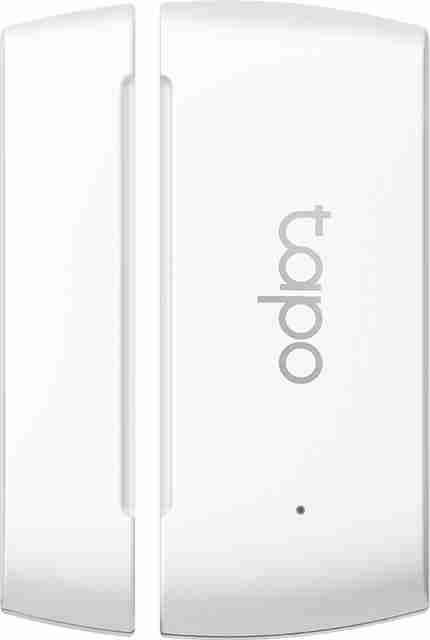
4. TP-Link Tapo T110 Contact Sensor – Best Battery
Key Specifications
- Product Type: Smart contact sensor
- Use Case: Door, window, cabinet, drawer, fridge, and safety monitoring
- Battery: CR2032 coin cell
- Battery Life: Up to 2 years
- Installation: 3M adhesive mounting
- Notifications: Door/window open alerts
- Automation: Can trigger lights, plugs, and cameras
- Hub Requirement: Tapo Hub required
- Voice Support: Alexa and Google Assistant support
- Best For: Door/window alerts, automation, and long battery life
TP-Link Tapo T110 is the best battery-focused smart home device for beginners because it offers up to 2-year battery life using a CR2032 battery. It is useful for real-time monitoring, instant notifications, simple automation, and easy installation.
Key Features
The Tapo T110 is a small sensor that tells you whether a door, window, cabinet, drawer, or fridge is open or closed.
This is useful for home security and automation. For example, when the main door opens, you can receive a phone alert. You can also create automation like “turn on the light when the door opens.”
It can also work with other Tapo devices. For example, opening a door can trigger a smart bulb or activate a Tapo camera.
The best part is battery life. Since it uses a low-power design, you do not need to charge it like a phone or smartwatch.
Real-World Performance
In real life, this device is useful but only if you understand its role. It is not a camera and it does not record video. It only detects open/close status.
It is best for main doors, balcony doors, windows, cupboards, drawers, and refrigerators. Parents can use it for child-safety zones. Homeowners can use it for security alerts.
The main limitation is that a Tapo Hub is required. Beginners should not buy it alone without checking the hub requirement.
Pros
- Excellent battery life: Up to 2 years means very low maintenance.
- Useful for automation: It can trigger lights, plugs, alarms, and cameras.
- Easy installation: 3M adhesive mounting makes setup simple.
- Good for safety: Helpful for door, window, cabinet, and fridge monitoring.
Cons
- Hub required: This is the biggest limitation for beginners.
- Not a security camera: It only detects open/close status.
- Works best inside one ecosystem: It is most useful when used with other Tapo products.
Best For: TP-Link Tapo T110 is best for users who want long battery life, door/window alerts, and simple home automation.
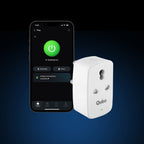
5. Qubo 16A Smart Plug – Best Value
Key Specifications
- Product Type: 16A smart plug
- Connectivity: Wi-Fi + Bluetooth
- Control: App control and voice control
- Automation: Scheduler and timer
- Energy Monitoring: Real-time energy monitoring
- Appliance Support: Heavy appliances like geysers, water pumps, air coolers, and compatible high-power appliances
- Best For: Appliance control, energy tracking, schedules, and heavy-load usage
Qubo 16A Smart Plug is the best value smart home device for beginners who want to make existing appliances smart. You do not need to replace the appliance. You can connect a compatible appliance to the smart plug and control it from your phone.
Key Features
The biggest advantage of a smart plug is that it can make a normal appliance smarter. You do not need to buy a new smart appliance.
You can switch devices on or off from your phone. You can also create schedules. For example, you can schedule a geyser to turn on before bath time or turn off automatically after a set time.
The 16A rating is useful for heavier appliances. But you must still check the power rating and plug type of your appliance before using it.
Energy monitoring is another useful feature. It helps you understand how much electricity a connected device is using.
Real-World Performance
In daily use, Qubo 16A Smart Plug is very practical. It is useful for geysers, water pumps, air coolers, mosquito repellents, lamps, and other compatible appliances.
For beginners, the most useful feature is scheduling. You can avoid leaving devices on by mistake.
Voice control works well when connected with Alexa or Google Assistant. For example, you can say, “Alexa, turn off the geyser.”
Pros
- Makes normal appliances smart: You do not need to buy new smart appliances.
- Good for heavy appliances: 16A support is more useful than basic 10A plugs for selected devices.
- Energy monitoring: Helps track electricity usage.
- Useful scheduling: Timers and schedules can improve safety and convenience.
Cons
- Not for every appliance: Always check appliance wattage and plug type before use.
- Needs stable Wi-Fi: Remote control depends on connectivity.
- Bulky design: It may block nearby sockets depending on your switchboard.
Best For: Qubo 16A Smart Plug is best for beginners who want to control heavy appliances, set schedules, and monitor energy usage.
Comparison Table
| Feature | Amazon Echo Pop | Wipro 9W Smart Bulb | TP-Link Tapo C200 | TP-Link Tapo T110 | Qubo 16A Smart Plug |
|---|---|---|---|---|---|
| Best For | Voice control and smart home command center | Lighting automation and mood control | Security, video monitoring, and motion alerts | Door/window alerts and automation | Appliance control and scheduling |
| Battery | No battery, plug-in device | No battery, works through electricity | No battery, needs continuous power | Battery-powered sensor | No battery, plug-in device |
| Camera | No camera | No camera | 1080p Full HD camera with pan/tilt and night vision | No camera | No camera |
| Beginner Friendly | Very good | Very good | Good | Good, but hub is required | Good |
Category Winners
Price Winner: Wipro 9W Wi-Fi Smart LED Bulb
Wipro 9W Smart Bulb wins in price because it is one of the cheapest ways to start a smart home. It is useful, easy to install, and does not require major setup.
Performance Winner: TP-Link Tapo C200
Tapo C200 wins in performance because it offers real security value with 1080p video, pan/tilt control, motion detection, night vision, two-way audio, and storage support.
Battery Winner: TP-Link Tapo T110 Contact Sensor
Tapo T110 wins in battery because it offers up to 2-year battery life. Most other beginner smart home devices are plug-in devices and do not have batteries.
Camera Winner: TP-Link Tapo C200
Tapo C200 clearly wins the camera category because it is the only dedicated security camera in this list.
Best Overall Winner: Amazon Echo Pop
Amazon Echo Pop wins overall because it makes the entire smart home easier to control using voice commands.
Buying Guide
1. Compatibility
Before buying any smart home device, check whether it works with Alexa, Google Assistant, Apple Home, or the app you already use. For beginners in India, Alexa and Google Assistant support is usually the safest choice.
2. Wi-Fi Requirement
Many smart devices work only on 2.4GHz Wi-Fi. If your router only shows 5GHz or has poor signal in the room, setup may fail. Before buying, check your Wi-Fi coverage.
3. Hub Requirement
Some devices work directly with Wi-Fi. Others need a hub. Smart bulbs and plugs usually work without a hub. Contact sensors and some buttons may need a hub. Always check this before ordering.
4. Power Rating
For smart plugs, power rating is very important. A 10A plug is not suitable for every heavy appliance. For geysers, pumps, and high-power devices, a 16A smart plug is safer, but you must still check appliance wattage.
5. App Quality
A smart device is only as good as its app. A bad app can make setup and daily control frustrating. Choose brands with reliable apps and good update support.
6. Privacy And Security
For cameras and voice assistants, privacy matters. Use strong passwords, enable two-factor authentication if available, update firmware, and avoid placing cameras in private areas.
Important Specs Explained
Processor
Most beginner smart home devices do not advertise processors like phones. Instead, focus on response time, app stability, Wi-Fi strength, and automation speed.
Battery
Some devices use battery power, like contact sensors and smart buttons. Others, like bulbs, plugs, speakers, and indoor cameras, need continuous electricity.
Display
Most beginner smart home devices do not have displays. Smart speakers may use light indicators, while cameras and bulbs are controlled through apps.
Camera
If security is your main need, choose a proper smart camera. Check resolution, night vision, two-way audio, storage support, privacy mode, and motion alerts.
Connectivity
Wi-Fi is common. Bluetooth helps during setup. Matter support is useful for future compatibility, but beginners should still check whether the device works with their preferred app.
Common Mistakes To Avoid
- Do not buy many smart devices at once.
- Do not ignore 2.4GHz Wi-Fi requirement.
- Do not buy sensors without checking hub requirement.
- Do not use a low-rated smart plug for heavy appliances.
- Do not place indoor cameras outdoors.
- Do not use weak passwords for smart cameras.
- Do not buy only because the product says “smart.”
- Do not mix too many apps in the beginning.
- Do not ignore warranty and service support.
Performance And Real-World Usage
Gaming Room Usage
Smart home devices are not gaming devices, but they can improve a gaming room setup. A smart bulb can create RGB lighting, a smart plug can turn on selected devices, and Echo Pop can play music or control room lights by voice.
Battery Usage
Most smart home devices in this list are plug-in devices. Echo Pop, Wipro Smart Bulb, Qubo Smart Plug, and Tapo C200 need electricity. Tapo T110 is battery-powered and is the best choice if you want a low-maintenance sensor.
Camera Usage
For camera usage, TP-Link Tapo C200 is the clear choice. It is useful for home security, baby monitoring, pets, elderly care, and small shop monitoring.
Daily Usage Experience
For daily use, the best beginner setup is simple: use Echo Pop for voice control, Wipro Smart Bulb for smart lighting, Qubo 16A Smart Plug for appliance scheduling, Tapo C200 for home monitoring, and Tapo T110 for door/window alerts.
Pros Of Smart Home Devices
- Convenience: You can control lights, plugs, cameras, and routines from your phone or voice assistant.
- Energy Saving: Smart plugs and schedules can help reduce electricity waste by turning devices off automatically.
- Better Security: Smart cameras and contact sensors help monitor your home and send alerts.
- Easy Start: Beginners can start with one bulb or one plug. You do not need a full home renovation.
- Voice Control: With a smart speaker like Echo Pop, controlling devices becomes easier for all family members.
Cons Of Smart Home Devices
- Wi-Fi Dependence: If your internet or router is unstable, smart devices may respond slowly.
- Privacy Concerns: Cameras and voice assistants need careful privacy settings.
- App Overload: Different brands use different apps, which can become confusing.
- Compatibility Issues: Not every smart device works with every assistant or automation platform.
- Initial Setup Can Be Confusing: Pairing mode, Wi-Fi selection, app permissions, and firmware updates may confuse first-time users.
Final Verdict
Best Overall Product: Amazon Echo Pop is the best overall smart home device for beginners. It works as a smart speaker, Alexa assistant, music device, and voice controller for other smart devices.
Best Budget Product: Wipro 9W Wi-Fi Smart LED Bulb is the best budget product. It is affordable, easy to install, and gives an immediate smart home experience.
Best Performance Product: TP-Link Tapo C200 is the best performance product because it offers real home security features like 1080p video, pan/tilt control, night vision, motion alerts, and two-way audio.
Best Battery Product: TP-Link Tapo T110 Contact Sensor is the best battery product because it offers up to 2-year battery life.
Best Value Product: Qubo 16A Smart Plug is the best value product because it makes existing appliances smart and adds scheduling plus energy monitoring.
Who Should Buy
You should buy smart home devices if you want convenience, automation, voice control, home security, energy monitoring, and better control over daily appliances.
Who Should Avoid
You should avoid smart home devices if your Wi-Fi is very unstable, you do not want to use mobile apps, or you are not comfortable managing device privacy and account security.
FAQs
1. What is the best smart home device for beginners?
Amazon Echo Pop is the best first smart home device for beginners because it lets you control compatible smart bulbs, plugs, and other devices using voice commands.
2. What is the cheapest way to start a smart home?
The cheapest way is to buy a smart bulb like the Wipro 9W Wi-Fi Smart LED Bulb. It is affordable, easy to install, and useful every day.
3. Do smart home devices need Wi-Fi?
Yes, most beginner smart home devices need Wi-Fi. Many devices specifically need 2.4GHz Wi-Fi, so check this before buying.
4. Do I need a hub for smart home devices?
Not always. Smart bulbs, smart plugs, and many cameras usually work without a hub. But some sensors, like TP-Link Tapo T110, require a hub.
5. Are smart cameras safe to use at home?
Smart cameras can be safe if you use strong passwords, update firmware, enable privacy settings, and avoid placing cameras in private areas like bedrooms or bathrooms.
6. Can I control smart home devices with my phone?
Yes. Most smart devices have mobile apps. You can turn devices on or off, create schedules, check camera feeds, and manage automation from your phone.
7. Which smart home device saves electricity?
A smart plug with scheduling and energy monitoring, like Qubo 16A Smart Plug, can help track usage and reduce unnecessary power consumption.
Conclusion
Smart home devices are useful, but beginners should start simple. Do not buy everything at once.
Start with Amazon Echo Pop if you want voice control. Add Wipro 9W Smart Bulb for lighting automation. Use Qubo 16A Smart Plug for appliance control. Choose TP-Link Tapo C200 if security is important. Add TP-Link Tapo T110 if you want door and window alerts with long battery life.
For most beginners, the best starting combination is Echo Pop + one smart bulb + one smart plug. This gives you voice control, lighting control, appliance scheduling, and a practical smart home experience without making the setup too complicated.

No comments:
Post a Comment