Buying a tablet for students is not simple anymore. Many tablets look good online, but after buying, students may face problems like slow performance, low storage, poor battery life, weak speakers, bad cameras for online classes, or a display that is uncomfortable for long study sessions.
This matters because students now use tablets for online classes, PDF reading, YouTube lectures, digital notes, assignments, video calls, browsing, light gaming, and entertainment.
A good budget tablet should not only be affordable. It should also be comfortable to use for long hours, have enough battery backup, support smooth multitasking, and offer a good display for reading.
In this guide, you will learn which budget tablets are best for students, which one gives the best performance, which one has the best battery, which one is best for online classes, and what mistakes you should avoid before buying.
Prices can change during sales, so always check the latest price, RAM variant, storage option, and Wi-Fi or LTE model before buying.
Related Guide: If you are buying student tech, also check our best accessories for students in 2026.
Quick Summary
- OnePlus Pad Go is the best overall budget tablet for students because it offers a sharp 2.4K display, Helio G99 processor, 8GB RAM, quad speakers, and 8000mAh battery.
- Redmi Pad SE is one of the best budget choices for students who want a large 11-inch display, Snapdragon 680, 8000mAh battery, and good entertainment features.
- Samsung Galaxy Tab A9+ is best for students who want a trusted brand, smooth 90Hz display, Samsung ecosystem, and better software experience.
- realme Pad 2 Lite is a strong battery-focused option with an 8300mAh battery, Helio G99 chipset, and 2K eye-comfort display.
- Lenovo Tab M11 is a good value tablet for students who want note-taking support, 90Hz display, Dolby Atmos speakers, and expandable storage.
- For online classes, choose a tablet with at least 4GB RAM, 128GB storage, good front camera, large battery, and a display above 10 inches.
- Do not buy a very cheap tablet only by looking at the price. Low RAM, old processors, and poor displays can create problems later.
Top Picks
- OnePlus Pad Go – Best Overall Budget Tablet For Students
- Redmi Pad SE – Best Budget Tablet
- Samsung Galaxy Tab A9+ – Best Performance And Software Experience
- realme Pad 2 Lite – Best Battery Tablet
- Lenovo Tab M11 – Best Value Tablet For Notes And Study
Best Budget Tablets For Students
1. OnePlus Pad Go – Best Overall

Key Specifications
- Display: 11.35-inch 2.4K LCD display
- Resolution: 2408 x 1720 pixels
- Refresh Rate: 90Hz
- Processor: MediaTek Helio G99
- RAM: 8GB
- Storage: 128GB / 256GB options
- Expandable Storage: Up to 1TB
- Battery: 8000mAh
- Charging: 33W SUPERVOOC
- Rear Camera: 8MP
- Front Camera: 8MP
- Speakers: Quad speakers with Dolby Atmos
- Best For: Online classes, PDF reading, video lectures, entertainment, and daily study use
Key Features
OnePlus Pad Go is the best overall budget tablet for students because it gives a strong balance of display, performance, speakers, battery, and software experience.
The biggest strength of OnePlus Pad Go is its display. The 2.4K resolution makes text sharper than normal Full HD tablets. This is useful for students who read PDFs, e-books, lecture notes, and web pages for long hours.
The 90Hz refresh rate makes scrolling smoother. When you move through PDFs, browser pages, or notes, the screen feels more responsive than a normal 60Hz tablet.
The MediaTek Helio G99 processor is good for student use. It can handle online classes, YouTube, Google Meet, Zoom, browsing, PDF reading, document editing, and light gaming.
The quad speakers with Dolby Atmos are also useful. Students who watch lectures, recorded classes, or educational videos will get loud and clear audio.
Real-World Performance
In real-world usage, OnePlus Pad Go feels smooth for daily student tasks. You can attend online classes, open notes, browse the web, watch lectures, and use apps like Google Docs, Microsoft Office, YouTube, Chrome, Gmail, and PDF readers without major issues.
For multitasking, the 8GB RAM variant is better. Students can switch between video lectures, notes, and browser tabs more comfortably.
Battery life is also good. The 8000mAh battery can handle a full day of moderate student usage. If you attend long video classes and keep brightness high, battery drain will be faster, but it is still reliable for most students.
Related Guide: If you also need a laptop for study, read our best laptops for students in 2026.
Pros
- Excellent 2.4K display: The high-resolution screen makes text, videos, and PDFs look sharp.
- Good performance for daily study tasks: The Helio G99 processor and 8GB RAM make it suitable for online classes, browsing, PDF reading, and multitasking.
- Strong speaker quality: Quad speakers with Dolby Atmos make lectures, movies, and videos sound clear.
- Good battery with fast charging: The 8000mAh battery and 33W charging make it practical for daily use.
Cons
- Not ideal for heavy gaming: It can handle casual games, but it is not made for high-end gaming.
- Display brightness is average for outdoor use: It is good indoors, but not the best under direct sunlight.
- Accessories may cost extra: Keyboard, cover, or stylus accessories may need to be purchased separately.
Best For: OnePlus Pad Go is best for students who want the best overall budget tablet for online classes, reading, entertainment, browsing, and daily productivity.
2. Redmi Pad SE – Best Budget

Key Specifications
- Display: 11-inch FHD+ display
- Resolution: 1920 x 1200 pixels
- Refresh Rate: 90Hz AdaptiveSync
- Processor: Qualcomm Snapdragon 680
- RAM: Up to 8GB
- Storage: 128GB
- Expandable Storage: Up to 1TB
- Battery: 8000mAh
- Rear Camera: 8MP
- Front Camera: 5MP
- Speakers: Quad speakers with Dolby Atmos
- Weight: Around 478g
- Best For: Budget students, PDF reading, YouTube lectures, and casual use
Key Features
Redmi Pad SE is one of the best budget tablets for students because it gives a large 11-inch display, Snapdragon 680 processor, 8000mAh battery, quad speakers, and expandable storage.
The 11-inch display is the main reason students should consider Redmi Pad SE. It gives more screen space than small 8-inch tablets, making it better for PDFs, online classes, presentations, and split-screen usage.
The Snapdragon 680 processor is power-efficient. It is good for basic student tasks like watching lectures, browsing, reading notes, attending video calls, and using educational apps.
The 8000mAh battery is another big advantage. Students can use it for long study sessions without charging again and again.
The tablet also supports split screen and floating windows. This is useful when students want to watch a lecture and take notes, or read a PDF while using a calculator.
Real-World Performance
In daily usage, Redmi Pad SE is good for basic and moderate student work. It is not as powerful as expensive tablets, but it is reliable for study-focused usage.
You can use it for YouTube classes, Google Meet, Zoom, PDFs, web browsing, and document editing. The 90Hz display makes scrolling smoother than basic 60Hz tablets.
For gaming, it can handle light and casual games, but heavy games will need lower graphics settings. Students should buy this mainly for learning and entertainment, not serious gaming.
Pros
- Good price-to-feature ratio: It gives a large display, decent processor, good battery, and quad speakers at a budget-friendly price.
- Large 11-inch screen: Good for online classes, notes, PDFs, and video lectures.
- Strong battery life: The 8000mAh battery is useful for long study sessions.
- Expandable storage: Students can store PDFs, videos, notes, and downloaded lectures using a microSD card.
Cons
- Processor is good but not very powerful: Snapdragon 680 is fine for daily use but not for heavy gaming or advanced multitasking.
- Front camera is basic: The 5MP front camera is usable for online classes but not excellent.
- Charging speed is not the fastest: Charging may take time because of the large battery.
Best For: Redmi Pad SE is best for students who want an affordable large-screen tablet for online classes, videos, PDFs, and daily learning.
3. Samsung Galaxy Tab A9+ – Best Performance And Software Experience

Key Specifications
- Display: 11-inch LCD display
- Resolution: 1920 x 1200 pixels
- Refresh Rate: 90Hz
- Processor: Qualcomm Snapdragon SM6375 / Snapdragon 695 series
- RAM: Up to 8GB
- Storage: Up to 128GB
- Expandable Storage: Up to 1TB
- Battery: 7040mAh
- Rear Camera: 8MP
- Front Camera: 5MP
- Speakers: Quad speakers with Dolby Atmos
- Best For: Samsung users, online classes, multitasking, and long-term reliability
Key Features
Samsung Galaxy Tab A9+ is a strong option for students who want a trusted brand, stable software, and better ecosystem features.
The Samsung Galaxy Tab A9+ is not always the cheapest tablet, but it is one of the most reliable choices. Samsung’s software experience is cleaner and more polished than many budget tablets.
The 11-inch display is good for studying, watching classes, and reading notes. The 90Hz refresh rate improves scrolling and daily usage.
Multi-window support is very helpful for students. You can use multiple apps on the screen, such as notes, browser, and video class.
Samsung also offers features like Quick Share, Samsung Notes, Secure Folder, and better device integration if you already use a Samsung phone.
Real-World Performance
In practical usage, Galaxy Tab A9+ is smooth for online classes, document editing, PDF reading, video lectures, and browsing.
The processor is better than many entry-level tablet chips. It is good for multitasking and general performance. Students who want a tablet for 2 to 3 years of use may prefer Samsung because of software stability and brand support.
The camera quality is basic, but good enough for online classes and document scanning in normal lighting.
Related Guide: If you are choosing devices for study and daily use, read our must-have tech products in 2026.
Pros
- Reliable brand and software: Samsung tablets usually offer a more stable software experience.
- Good multitasking features: Multi-window support is useful for students who work with notes, PDFs, and browser tabs.
- Good display and speakers: The 11-inch display and quad speakers make it good for learning and entertainment.
- Expandable storage: Students can add a microSD card for more files and videos.
Cons
- Price can be higher than other budget tablets: Samsung tablets often cost more than Redmi or Lenovo alternatives.
- Charging speed is not very fast: The charging experience may feel slow compared to some competitors.
- Camera is only basic: It is fine for classes, but not for high-quality photography.
Best For: Samsung Galaxy Tab A9+ is best for students who want reliable performance, Samsung software features, and a trusted long-term tablet.
4. realme Pad 2 Lite – Best Battery
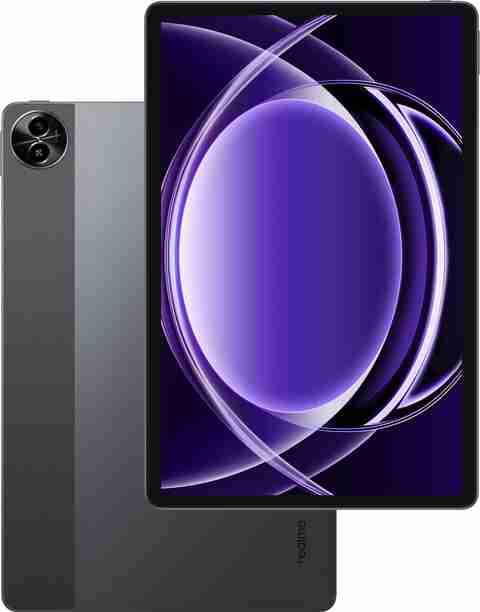
Key Specifications
- Display: 10.95-inch 2K Eye Comfort Display
- Refresh Rate: 90Hz
- Processor: MediaTek Helio G99
- RAM: Up to 8GB physical RAM with dynamic RAM support
- Storage: 128GB
- Battery: 8300mAh
- Rear Camera: 8MP
- Front Camera: 5MP
- Speakers: Stereo quad speakers
- Software: realme UI based on Android
- Best For: Battery backup, online classes, video lectures, and entertainment
Key Features
realme Pad 2 Lite is a good student tablet if battery backup and performance matter more than brand ecosystem.
The biggest advantage of realme Pad 2 Lite is its battery. The 8300mAh battery is slightly larger than many competitors, which makes it useful for students who attend classes, watch lectures, and study for long hours.
The Helio G99 processor is also strong for this price segment. It performs better than many entry-level chips and is suitable for multitasking, video streaming, browsing, and light gaming.
The 2K eye-comfort display is helpful for reading and watching videos. Students who spend hours on digital books and notes will appreciate the larger and sharper display.
Real-World Performance
In daily use, realme Pad 2 Lite works well for online classes, YouTube lectures, Google Meet, PDF reading, and entertainment.
The Helio G99 processor gives smooth performance for normal student work. Apps open quickly, scrolling feels good, and the tablet handles multiple basic apps well.
Battery performance is the main highlight. With moderate usage, students can expect strong backup. Heavy video calling and gaming will reduce battery faster, but the tablet still performs well for long study sessions.
Pros
- Excellent battery capacity: The 8300mAh battery is useful for students who study for long hours.
- Good processor for the price: Helio G99 is capable for daily study apps, browsing, and light gaming.
- 2K eye-comfort display: The display is good for PDFs, lectures, and entertainment.
- Good speakers: Quad speaker setup makes online classes and videos more enjoyable.
Cons
- Software experience may not feel as premium as Samsung: realme UI is useful, but some users may prefer Samsung’s tablet software.
- Camera is average: The camera is enough for classes, but not for photography.
- Availability and pricing can change: This model may vary in price across different platforms.
Best For: realme Pad 2 Lite is best for students who want strong battery life, good performance, and a large display at a budget price.
5. Lenovo Tab M11 – Best Value

Key Specifications
- Display: 11-inch FHD display
- Resolution: 1920 x 1200 pixels
- Refresh Rate: 90Hz
- Processor: MediaTek Helio G88
- RAM: 4GB / 8GB variants
- Storage: 128GB
- Expandable Storage: Up to 1TB
- Battery: 7040mAh
- Rear Camera: 13MP
- Front Camera: 8MP
- Speakers: Quad speakers with Dolby Atmos
- Protection: IP52 dust and water resistance
- Best For: Note-taking, study apps, reading, and value-focused buyers
Key Features
Lenovo Tab M11 is a good value tablet for students because it offers a large display, optional Lenovo Tab Pen support, Dolby Atmos speakers, expandable storage, and a student-friendly design.
Lenovo Tab M11 is especially useful for students who want a tablet for notes and reading. Some variants support Lenovo Tab Pen, which can help with writing notes, marking PDFs, and basic drawing.
The 11-inch display is large enough for online classes and reading. The 90Hz refresh rate makes the interface smoother.
The quad speakers with Dolby Atmos are useful for lectures and entertainment. The 13MP rear camera is also better on paper than many budget tablets, which helps with document scanning.
Real-World Performance
In daily usage, Lenovo Tab M11 is good for reading, online classes, document editing, video lectures, and light multitasking.
The Helio G88 processor is not as strong as Helio G99, but it is good for basic student work. If your usage is mostly PDFs, YouTube, browser, classroom apps, and notes, it should work well.
The optional pen support makes it more useful for students who want handwriting and PDF annotation.
Related Guide: If you are looking for portable study devices, also read our best lightweight laptops in 2026.
Pros
- Good value for students: It gives a large display, good speakers, expandable storage, and pen support options.
- Useful for note-taking: Lenovo Tab Pen support can help students write notes and mark PDFs.
- Better camera setup than many budget tablets: The 13MP rear camera is useful for scanning documents.
- Expandable storage: Good for students who download lectures, books, and files.
Cons
- Performance is not the strongest: Helio G88 is good for basic use but weaker than Helio G99.
- Pen may not be included with every variant: Check the product listing carefully before buying.
- Not ideal for heavy gaming: It is better for study and entertainment than gaming.
Best For: Lenovo Tab M11 is best for students who want a value tablet for notes, reading, online classes, and basic productivity.
Comparison Table
| Feature | OnePlus Pad Go | Redmi Pad SE | Samsung Galaxy Tab A9+ | realme Pad 2 Lite | Lenovo Tab M11 |
|---|---|---|---|---|---|
| Best For | Overall use | Budget students | Software and reliability | Battery | Value and note-taking |
| Display | 11.35-inch 2.4K | 11-inch FHD+ | 11-inch LCD | 10.95-inch 2K | 11-inch FHD |
| Processor | Helio G99 | Snapdragon 680 | Snapdragon-series processor | Helio G99 | Helio G88 |
| Battery | 8000mAh | 8000mAh | 7040mAh | 8300mAh | 7040mAh |
| Camera | 8MP rear / 8MP front | 8MP rear / 5MP front | 8MP rear / 5MP front | 8MP rear / 5MP front | 13MP rear / 8MP front |
| Storage | 128GB / 256GB | 128GB | Up to 128GB | 128GB | 128GB |
Category Winners
Price Winner: Redmi Pad SE
Redmi Pad SE wins in price because it usually offers a large display, good battery, quad speakers, and useful study features at a lower price than OnePlus and Samsung.
Performance Winner: OnePlus Pad Go
OnePlus Pad Go wins in overall performance because of its Helio G99 processor, 8GB RAM, 2.4K display, and smooth daily experience.
Battery Winner: realme Pad 2 Lite
realme Pad 2 Lite wins in battery because it offers an 8300mAh battery, which is larger than the 8000mAh battery on OnePlus Pad Go and Redmi Pad SE.
Camera Winner: Lenovo Tab M11
Lenovo Tab M11 wins for camera on paper because it offers a 13MP rear camera and 8MP front camera. This is useful for scanning notes, documents, and assignments.
Value Winner: Lenovo Tab M11
Lenovo Tab M11 is the best value option for students who want a good display, speakers, storage, note-taking support, and practical daily features.
Buying Guide
1. Display Size And Quality
For students, display quality is very important. A tablet is mainly used for reading, writing, watching classes, and browsing.
Choose a tablet with at least a 10.5-inch display. An 11-inch tablet is better for PDFs and split-screen usage.
Also check resolution. A Full HD or 2K display is better for reading small text clearly. Avoid very low-resolution tablets because they can cause eye strain during long study sessions.
2. Processor
The processor decides how smooth the tablet feels. For student use, the tablet should handle online classes, PDF reading, browsing, YouTube, note-taking, and basic multitasking.
Good budget processors include MediaTek Helio G99, Snapdragon 680, Snapdragon 695 series, and MediaTek Helio G88.
For better performance, choose Helio G99 or Snapdragon 695-based tablets. For basic use, Snapdragon 680 or Helio G88 is acceptable.
3. RAM
RAM is important for multitasking. A tablet with low RAM can lag when switching between apps.
For students, 4GB RAM is the minimum. But 6GB or 8GB RAM is better if you want smoother performance.
If you attend online classes, open notes, browse the web, and use PDF apps together, choose 8GB RAM if your budget allows.
4. Storage
Students need storage for PDFs, recorded classes, assignments, images, documents, and apps.
Choose at least 128GB storage. Also check whether the tablet supports a microSD card. Expandable storage is useful if you download large lecture videos.
5. Battery
Battery life matters because students may use tablets for long study sessions. A good student tablet should have at least a 7000mAh battery.
8000mAh or above is better. Tablets like OnePlus Pad Go, Redmi Pad SE, and realme Pad 2 Lite are strong in this area.
6. Front Camera
For online classes, the front camera is more important than the rear camera. A 5MP front camera is usable, but an 8MP front camera is better.
If you attend many Zoom, Google Meet, or Microsoft Teams classes, choose a tablet with a better front camera.
7. Speakers
Good speakers help during online classes and video lectures. Quad speakers are better than dual speakers.
If you watch lectures without earphones, choose a tablet with Dolby Atmos or quad speaker support.
8. Software And Updates
Software experience affects long-term use. Samsung usually gives a more polished tablet experience. OnePlus also offers a clean and smooth interface.
Budget tablets may not always receive long software updates, so check update policy if you plan to use the tablet for several years.
Important Specs Explained
Processor
The processor is the brain of the tablet. It controls speed, app opening time, multitasking, gaming, and overall smoothness.
For students, you do not need a flagship processor. But avoid very old chips if you want the tablet to last longer.
Battery
Battery capacity is measured in mAh. Higher mAh usually means longer backup, but software optimization also matters.
For students, 7000mAh to 8300mAh is good. If you attend long online classes, choose a tablet with at least 8000mAh.
Display
Display quality affects comfort. A sharper display makes reading easier. A 90Hz refresh rate makes scrolling smoother.
For students, Full HD+ or 2K resolution is recommended.
RAM
RAM helps the tablet keep apps open in memory. More RAM means better multitasking.
4GB RAM is acceptable for basic study use. 8GB RAM is better for smoother performance.
Storage
Storage is where your apps, PDFs, videos, and files are saved. 64GB can become full quickly. 128GB is safer.
Expandable storage is a big advantage for students.
Camera
Tablet cameras are usually average. The front camera matters most for online classes. The rear camera is useful for scanning documents, notes, and assignments.
Common Mistakes To Avoid
- Do not buy a tablet only because it is cheap.
- Do not choose 2GB or 3GB RAM tablets for serious study use.
- Do not ignore display resolution if you read PDFs daily.
- Do not buy a tablet without checking expandable storage.
- Do not expect laptop-level performance from budget tablets.
- Do not buy only for gaming if your main need is study.
- Do not assume every tablet supports a stylus.
- Do not forget to check whether the pen or keyboard is included in the box.
- Do not ignore software updates and brand service support.
Performance And Real-World Usage
Gaming Performance
Budget tablets can handle casual games like Subway Surfers, Clash of Clans, Free Fire, Ludo King, and basic racing games.
For heavier games like BGMI, Call of Duty Mobile, and Genshin Impact, you will need to reduce graphics settings. OnePlus Pad Go and realme Pad 2 Lite are better for gaming because they use the Helio G99 processor.
Redmi Pad SE can handle light gaming, but it is not made for serious gaming. Lenovo Tab M11 is also better for casual gaming than heavy gaming.
Samsung Galaxy Tab A9+ performs well for casual and moderate games, but gaming performance depends on the exact variant.
Battery Usage
For normal student usage, most tablets in this list can last a full day.
Online classes drain battery faster because they use the camera, microphone, speaker, Wi-Fi, and screen continuously.
For best battery life, keep brightness around 40 to 60%, close unused apps, turn off unnecessary notifications, and use Wi-Fi instead of mobile data when possible.
realme Pad 2 Lite has the largest battery in this list. OnePlus Pad Go and Redmi Pad SE are also strong battery options.
Camera Usage
Tablet cameras are not designed for professional photography. They are mainly useful for online classes, video calls, document scanning, and assignment photos.
For online classes, an 8MP front camera is better than 5MP. OnePlus Pad Go and Lenovo Tab M11 are stronger in this area.
For scanning documents, Lenovo Tab M11 has a useful 13MP rear camera, which gives it an advantage.
Daily Usage Experience
For daily student use, OnePlus Pad Go gives the most balanced experience. It feels smooth, has a sharp display, good speakers, and strong battery.
Redmi Pad SE is the best if you want to spend less but still need a big screen. Samsung Galaxy Tab A9+ is best if you want reliable software and better brand trust.
realme Pad 2 Lite is best if you want battery and performance. Lenovo Tab M11 is best if you want value and note-taking support.
Related Guide: For more useful student devices, read our best gadgets for daily use in 2026.
Pros Of Budget Tablets For Students
- Large display for study: Budget tablets now offer 10.95-inch and 11-inch displays, which are much better than small phone screens for reading PDFs and watching lectures.
- Good battery life: Most good budget tablets now come with 7000mAh to 8300mAh batteries, which is enough for long study sessions.
- Better speakers: Quad speakers are now available in many budget tablets, improving online classes and video lectures.
- Expandable storage: MicroSD card support helps students store PDFs, books, assignments, and downloaded videos.
- Good for online classes: These tablets are suitable for Zoom, Google Meet, Microsoft Teams, YouTube lectures, and learning apps.
- Affordable compared to laptops: A budget tablet is much cheaper than a laptop and easier to carry.
Cons Of Budget Tablets For Students
- Not a full laptop replacement: Budget tablets are useful for study, but they cannot fully replace a laptop for coding, advanced editing, or professional software.
- Average cameras: Most tablet cameras are basic. They are fine for classes and scanning, but not for photography.
- Accessories cost extra: Keyboard, stylus, cover, and screen protector may need to be purchased separately.
- Limited heavy gaming: Budget tablets are not made for high-end gaming. They can run casual games but may struggle with heavy titles.
- Software updates can vary: Some brands may not provide updates for many years. Always check the brand’s update policy.
Final Verdict
Best Overall Tablet: OnePlus Pad Go is the best overall budget tablet for students. It has a sharp 2.4K display, Helio G99 processor, 8GB RAM, quad speakers, 8000mAh battery, and good daily performance.
Best Budget Tablet: Redmi Pad SE is the best budget tablet for students. It gives a large 11-inch screen, Snapdragon 680 processor, 8000mAh battery, quad speakers, and expandable storage at a budget-friendly price.
Best Battery Tablet: realme Pad 2 Lite is the best battery-focused tablet because it offers an 8300mAh battery with a good display and Helio G99 processor.
Best Value Tablet: Lenovo Tab M11 is the best value option for students who want note-taking support, good speakers, expandable storage, and a large display.
Best Software Experience: Samsung Galaxy Tab A9+ is best for students who want brand trust, stable software, and Samsung ecosystem features.
Who Should Buy These Tablets
- Students who need a device for online classes.
- Students who read PDFs, notes, and e-books daily.
- Users who watch YouTube lectures and recorded classes.
- Students who need a device for browsing, assignments, and light gaming.
- Users who want a bigger screen than a smartphone at a lower price than a laptop.
Who Should Avoid Budget Tablets
- Users who need laptop-level performance.
- Students who need coding tools and desktop software.
- Users who want advanced video editing.
- Heavy gamers who need high graphics performance.
- Professional artists who need advanced stylus performance.
FAQs
1. Which is the best budget tablet for students?
OnePlus Pad Go is the best overall budget tablet for students because it offers a sharp 2.4K display, Helio G99 processor, 8GB RAM, quad speakers, 8000mAh battery, and good software experience.
2. Which tablet is best for online classes?
OnePlus Pad Go and Samsung Galaxy Tab A9+ are very good for online classes. OnePlus Pad Go has an 8MP front camera and strong speakers, while Samsung Galaxy Tab A9+ offers reliable software and good multitasking.
3. Is 4GB RAM enough for a student tablet?
4GB RAM is enough for basic study use, such as PDF reading, YouTube, browsing, and online classes. But 6GB or 8GB RAM is better if you want smoother multitasking and longer usability.
4. Which tablet has the best battery for students?
realme Pad 2 Lite has the biggest battery in this list with 8300mAh capacity. OnePlus Pad Go and Redmi Pad SE are also good battery options with 8000mAh batteries.
5. Can budget tablets replace laptops for students?
Budget tablets can replace laptops for basic study tasks like online classes, PDFs, notes, browsing, and video lectures. But they cannot fully replace laptops for coding, advanced document work, professional editing, or desktop software.
6. Which tablet is best for PDF reading?
OnePlus Pad Go is excellent for PDF reading because of its 2.4K display. Redmi Pad SE and Samsung Galaxy Tab A9+ are also good because they have large 11-inch screens.
7. Should students buy Wi-Fi or 4G tablet?
If you mostly study at home or college with Wi-Fi, a Wi-Fi tablet is enough. If you travel often or need internet without hotspot, choose a 4G or LTE variant.
Conclusion
A good student tablet should have a large display, good battery, enough RAM, decent processor, clear speakers, and reliable software.
For most students, OnePlus Pad Go is the best overall choice because it gives the best balance of display, performance, battery, and speakers.
Choose Redmi Pad SE if you want the best budget tablet. Choose Samsung Galaxy Tab A9+ if you want brand trust and better software. Choose realme Pad 2 Lite if battery life is your priority. Choose Lenovo Tab M11 if you want value and note-taking support.
Before buying, check the latest price, RAM variant, storage, Wi-Fi or 4G option, and whether accessories like pen or keyboard are included. This will help you choose the right tablet and avoid wasting money.

No comments:
Post a Comment