Buying a phone, tablet, monitor, or laptop has become confusing because every brand now talks about refresh rate. You may see terms like 60Hz, 90Hz, 120Hz, 144Hz, LTPO, adaptive refresh rate, touch sampling rate, and high refresh display.
The problem is that many buyers do not know what refresh rate actually means. Some people think higher refresh rate always means better performance. Some people buy a 120Hz phone but do not understand why the battery drains faster. Some gamers want 144Hz, but their device processor cannot deliver enough frames. So the number alone does not tell the full story.
The display is the part you use every day. Whether you scroll Instagram, watch YouTube, play games, read articles, attend online classes, or edit videos, refresh rate affects how smooth the screen feels.
In this guide, you will learn what refresh rate means, how 60Hz, 90Hz, 120Hz, and 144Hz are different, who actually needs a high refresh rate, what mistakes to avoid, and which devices are good examples of different refresh rate categories.
Quick Summary
- Refresh rate means how many times the screen updates every second.
- 60Hz means the display refreshes 60 times per second.
- 120Hz feels smoother than 60Hz while scrolling, gaming, and using animations.
- 144Hz is mainly useful for gamers and performance-focused users.
- Higher refresh rate can use more battery if the device is not optimized.
- Adaptive refresh rate helps save battery by changing refresh rate based on content.
- Do not buy only by looking at refresh rate; processor, display quality, battery, and software also matter.
Top Picks
- OnePlus Nord 4 – Best Overall
- Redmi Note 14 5G – Best Budget
- iQOO 13 – Best Performance
- Samsung Galaxy M35 5G – Best Battery
Best Refresh Rate Devices Explained
1. OnePlus Nord 4 – Best Overall
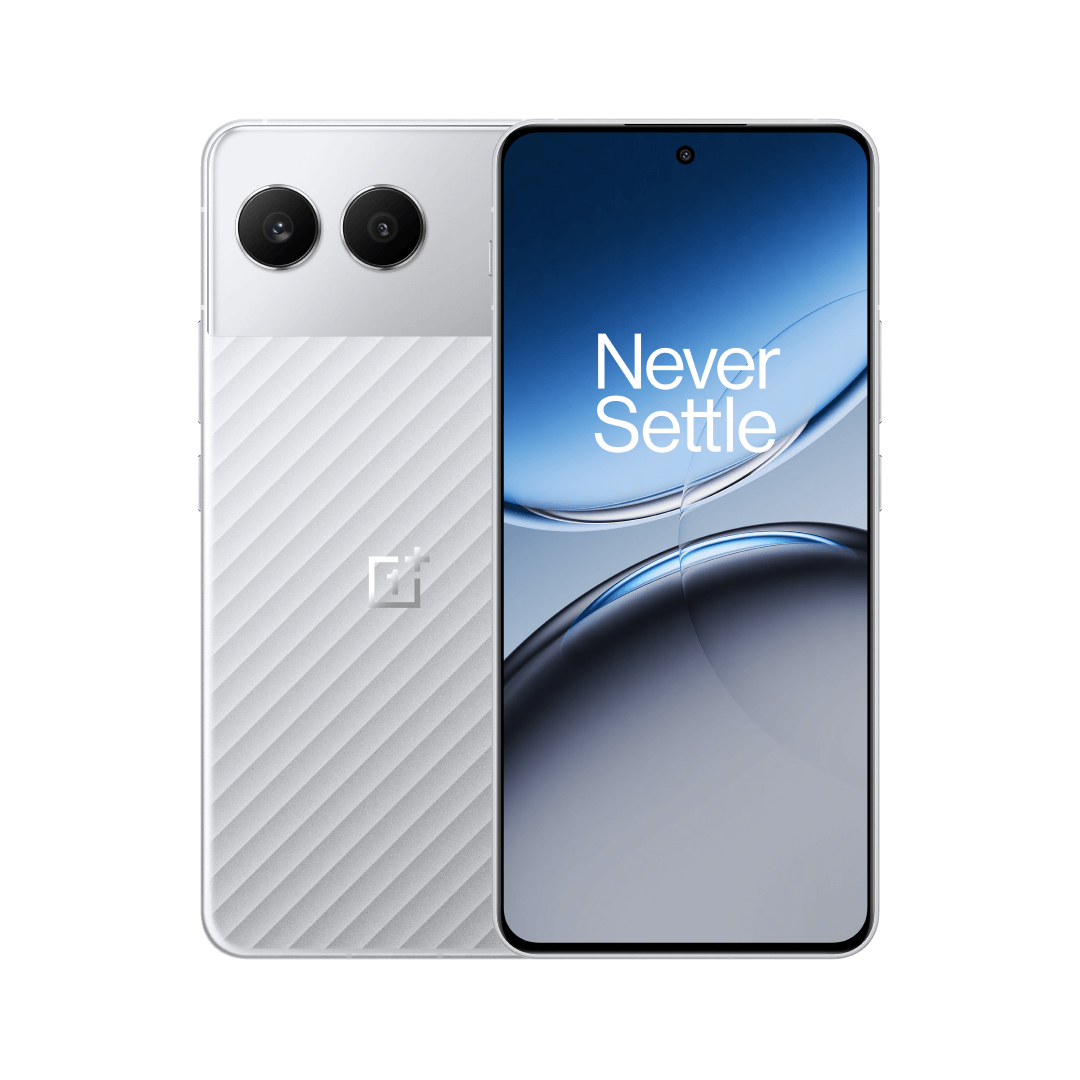
Key Specifications
- Display: 6.74-inch AMOLED
- Resolution: 2772 x 1240 pixels
- Refresh Rate: Up to 120Hz
- Processor: Snapdragon 7+ Gen 3
- RAM: 8GB / 12GB LPDDR5X
- Storage: 128GB UFS 3.1 / 256GB UFS 4.0
- Battery: 5500mAh
- Charging: 100W SUPERVOOC
- Rear Camera: 50MP main camera with OIS + 8MP ultra-wide
- Best For: Smooth daily use, social media, gaming, videos, and value buyers
OnePlus Nord 4 is a strong example of a balanced 120Hz smartphone. It gives a smooth display, strong processor, good battery, and fast charging, which makes it useful for daily users and performance-focused buyers.
Key Features
The biggest benefit of OnePlus Nord 4 is balance. It gives a smooth 120Hz display, strong processor, good battery, and fast charging.
A 120Hz display makes normal daily usage feel smoother. Scrolling through Instagram, YouTube comments, Chrome pages, settings, and app menus feels faster and more fluid than 60Hz.
The Snapdragon 7+ Gen 3 processor is powerful enough to support smooth performance in daily apps and many games. This is important because refresh rate works best when the processor can keep up.
Real-World Performance
In real life, OnePlus Nord 4 feels smooth for daily use. App animations, scrolling, multitasking, and gaming feel responsive.
For normal users, 120Hz is more than enough. You do not need 144Hz unless you are a serious gamer.
Battery life is also practical because the phone has a 5500mAh battery. However, using high refresh rate all the time can reduce battery compared to 60Hz mode.
Pros
- Smooth 120Hz display: The screen feels fast and responsive for scrolling, browsing, and social media.
- Good processor support: Snapdragon 7+ Gen 3 is strong enough to make the 120Hz display useful.
- Fast charging: 100W charging is helpful for heavy users.
- Good value balance: It offers performance, display quality, battery, and design at a practical price.
Cons
- Not a 144Hz gaming phone: Serious gamers may prefer a more gaming-focused phone like iQOO 13.
- No expandable storage: Choose 256GB if you store many videos and games.
- Camera is good but not flagship-level: It is fine for daily use, but not the best camera phone.
Best For: OnePlus Nord 4 is best for users who want a smooth 120Hz display with good overall performance, battery, and value.
2. Redmi Note 14 5G – Best Budget
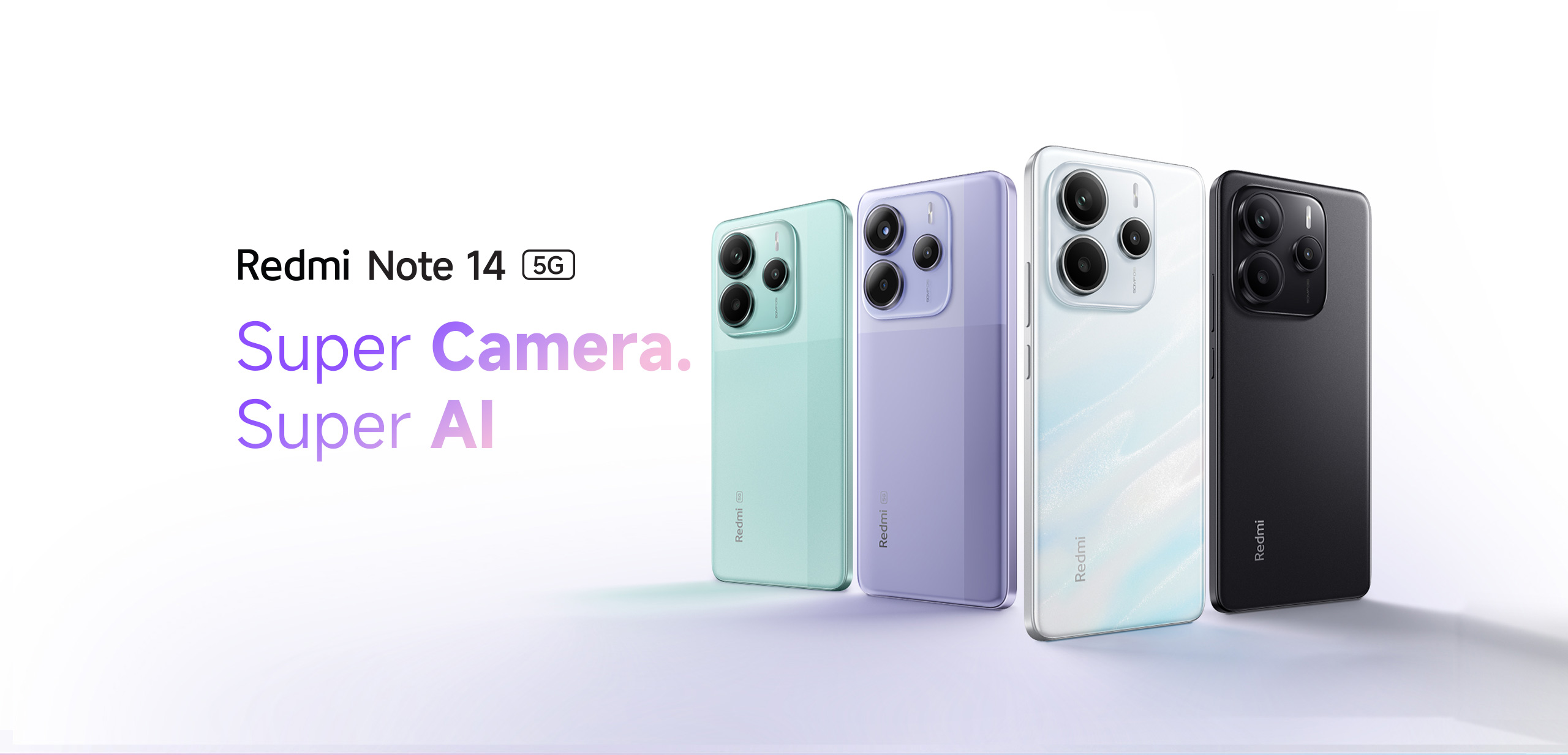
Key Specifications
- Display: 6.67-inch FHD+ AMOLED
- Refresh Rate: 120Hz
- Peak Brightness: Up to 2100 nits
- Processor: MediaTek Dimensity 7025-Ultra
- Rear Camera: 50MP Sony LYT-600 with OIS + EIS
- Front Camera: 20MP
- Battery: 5110mAh
- Charging: 45W fast charging
- Protection: Gorilla Glass 5, IP64
- Best For: Budget users, students, entertainment, and smooth scrolling
Redmi Note 14 5G is a good budget example because it brings 120Hz AMOLED display technology to a lower price segment. It is useful for students, normal users, and buyers who want a smooth display without spending flagship money.
Key Features
The main advantage of Redmi Note 14 5G is that it gives a smooth display without a high flagship price.
A 120Hz AMOLED panel is useful for daily use. Colours look better than normal LCD screens, and scrolling feels smoother than 60Hz.
The 2100 nits peak brightness is also useful outdoors. A high refresh rate is enjoyable only when the display is also bright and clear.
Real-World Performance
For normal daily use, Redmi Note 14 5G is smooth. WhatsApp, Instagram, YouTube, Chrome, online classes, and normal browsing work well.
For gaming, the 120Hz display helps only if the game supports high frame rates and the processor can deliver them. Casual gaming works fine, but this is not a dedicated gaming phone.
Battery life is good for normal users. If you keep brightness high and use 120Hz all day, battery drain will be faster.
Pros
- Affordable 120Hz AMOLED display: It gives a premium-feeling screen at a budget-friendly level.
- Good brightness: Outdoor visibility is better than many basic phones.
- Good battery capacity: 5110mAh is practical for daily usage.
- OIS camera support: OIS helps reduce blur in photos and videos.
Cons
- Not ideal for heavy gaming: 120Hz display does not automatically mean flagship gaming.
- Software may include extra apps: Some users may need to remove unwanted apps.
- 128GB storage can fill quickly: Heavy users should choose a higher storage variant if available.
Best For: Redmi Note 14 5G is best for budget buyers who want a smooth 120Hz AMOLED display without spending too much.
3. iQOO 13 – Best Performance

Key Specifications
- Display: 2K 144Hz AMOLED display
- Processor: Snapdragon 8 Elite
- RAM: 12GB / 16GB
- Storage: 256GB / 512GB
- Rear Camera: Triple 50MP camera setup
- Front Camera: 32MP
- Battery: 6000mAh
- Charging: 120W fast charging
- Cooling: Advanced cooling system
- Best For: Gaming, high performance, heavy users, and smooth display experience
iQOO 13 is the best performance example because it offers a 144Hz display with a powerful processor. It is made for users who want smooth gaming, fast animations, strong battery, and high-end performance.
Key Features
The biggest reason to choose iQOO 13 is performance. A 144Hz refresh rate is mainly useful when the device has enough power to support high frame rates.
The Snapdragon 8 Elite processor helps games and heavy apps run smoothly. The 144Hz screen makes supported games and animations feel extremely responsive.
The 2K resolution also improves sharpness. This means the display is not only fast but also detailed.
Real-World Performance
In real use, iQOO 13 is excellent for gaming. Games that support high frame rates feel smoother. Scrolling, animations, and touch response also feel fast.
However, not every game runs at 144fps. Some games are locked to 60fps or 90fps. So even if your phone has 144Hz, the app or game must support it.
Battery life is strong because of the 6000mAh battery, but high refresh gaming can drain battery faster. Fast charging helps recover battery quickly.
Pros
- Excellent 144Hz display: Great for gamers and users who want the smoothest experience.
- Powerful processor: Snapdragon 8 Elite can support demanding apps and games.
- Strong battery: 6000mAh battery is useful for heavy users.
- Fast charging: 120W charging reduces waiting time.
Cons
- More expensive than budget phones: Performance phones cost more.
- 144Hz is not needed by everyone: Normal users may not notice a big difference over 120Hz.
- High refresh gaming drains battery: Heavy gaming at high frame rates uses more power.
Best For: iQOO 13 is best for gamers, power users, and buyers who want the highest refresh rate experience with flagship-level performance.
4. Samsung Galaxy M35 5G – Best Battery

Key Specifications
- Display: 6.6-inch Super AMOLED
- Resolution: 1080 x 2340 pixels
- Refresh Rate: 120Hz
- Processor: Exynos 1380
- RAM: 6GB / 8GB
- Storage: 128GB / 256GB
- Rear Camera: 50MP + 8MP + 2MP
- Front Camera: 13MP
- Battery: 6000mAh
- Charging: 25W support
- Best For: Battery life, students, daily users, and media consumption
Samsung Galaxy M35 5G is a good battery-focused example of a 120Hz phone. It is useful for users who want a smooth AMOLED display but also care about long battery backup.
Key Features
The biggest strength of Galaxy M35 5G is battery life. A 120Hz screen can use more battery than 60Hz, so a large battery helps.
The Super AMOLED panel makes videos and daily content look good. The 120Hz refresh rate makes scrolling smoother.
This phone is a good example for users who want smooth display experience but also care about long battery backup.
Real-World Performance
In real-world use, Galaxy M35 5G is good for students, office users, and normal daily users. It handles YouTube, WhatsApp, browsing, online classes, and social media well.
The 6000mAh battery helps the phone last longer than many slim phones. This is useful if you travel or use mobile data heavily.
The charging speed is only 25W, so charging may take longer than phones with 67W, 100W, or 120W charging.
Pros
- Large 6000mAh battery: Good for users who want long backup.
- Smooth 120Hz AMOLED display: Scrolling and animations feel better than 60Hz.
- Good storage flexibility: microSD support is useful for photos, videos, and files.
- Good for daily use: Suitable for students, parents, office users, and media watchers.
Cons
- Charging is not very fast: 25W charging feels slow compared to competitors.
- Phone is slightly heavy: Large battery phones are usually heavier.
- Not a flagship gaming device: It is better for battery and daily use than extreme gaming.
Best For: Samsung Galaxy M35 5G is best for users who want a smooth 120Hz display with long battery life.
Comparison Table
| Feature | OnePlus Nord 4 | Redmi Note 14 5G | iQOO 13 | Samsung Galaxy M35 5G |
|---|---|---|---|---|
| Best For | Balanced 120Hz experience | Budget 120Hz AMOLED | 144Hz gaming performance | 120Hz with battery life |
| Performance | Strong daily performance with Snapdragon 7+ Gen 3 | Good daily performance with Dimensity 7025-Ultra | Best performance with Snapdragon 8 Elite | Good for daily use and media |
| Battery | 5500mAh with 100W charging | 5110mAh with 45W charging | 6000mAh with 120W charging | 6000mAh with 25W charging |
| Camera | 50MP OIS main camera | 50MP Sony OIS camera | Triple 50MP rear camera setup | 50MP triple rear camera setup |
Category Winners
Price Winner: Redmi Note 14 5G
Redmi Note 14 5G wins in price because it offers a 120Hz AMOLED display at a more affordable level.
Performance Winner: iQOO 13
iQOO 13 wins in performance because it has a 144Hz display and Snapdragon 8 Elite processor.
Battery Winner: Samsung Galaxy M35 5G
Samsung Galaxy M35 5G wins for battery because it offers a large 6000mAh battery with a 120Hz AMOLED display.
Camera Winner: iQOO 13
iQOO 13 wins in camera among these examples because it offers a triple 50MP camera setup and strong processing power.
Value Winner: OnePlus Nord 4
OnePlus Nord 4 wins value because it gives a strong 120Hz display, good processor, fast charging, and balanced daily performance.
Buying Guide
1. Refresh Rate Number
The refresh rate tells you how many times the display updates per second.
- 60Hz: The display refreshes 60 times per second.
- 90Hz: The display refreshes 90 times per second.
- 120Hz: The display refreshes 120 times per second.
- 144Hz: The display refreshes 144 times per second.
Higher numbers can feel smoother, but only when the device performance supports it.
Related Guide: For a direct comparison, read our guide on 60Hz vs 120Hz display.
2. Display Type
A 120Hz AMOLED display usually feels better than a 120Hz basic LCD because AMOLED gives better contrast, deeper blacks, and richer colours.
So do not check only refresh rate. Check display type also.
Related Guide: To understand display panels, read AMOLED vs LCD display.
3. Processor
The processor must be powerful enough to push high frame rates. A weak processor with a 120Hz display may still lag.
For gaming, processor matters a lot. For daily scrolling, even mid-range processors can handle 120Hz well.
Related Guide: If you are choosing a phone processor, read Snapdragon vs MediaTek processor.
4. Battery
High refresh rate can use more battery. Phones with adaptive refresh rate or larger batteries manage this better.
If battery is important, choose a phone with at least 5000mAh battery.
Related Guide: To understand battery numbers, read battery mAh explained.
5. Adaptive Refresh Rate
Adaptive refresh rate changes automatically based on what you are doing.
For example, the phone may use 120Hz while scrolling and reduce to 60Hz while watching static content. This saves battery.
6. Touch Sampling Rate
Refresh rate and touch sampling rate are different.
Refresh rate is how often the screen updates. Touch sampling rate is how often the screen reads your finger touch.
Gamers should check both.
Important Specs Explained
Processor
A processor affects whether the phone can deliver smooth frames. For high-refresh gaming, Snapdragon 8 series or strong Dimensity chips are better.
Battery
High refresh rate can drain battery faster. A larger battery and efficient processor help balance smoothness and backup.
Display
AMOLED, OLED, LCD, brightness, resolution, and refresh rate all matter. A smooth but dull display is not ideal.
Camera
Refresh rate does not directly improve camera quality. But a smooth screen helps while previewing photos, recording videos, and editing content.
Software Optimization
Good software makes high refresh rate feel smooth. Poor software can make even a 120Hz phone feel laggy.
Common Mistakes To Avoid
- Do not buy a phone only because it has 120Hz.
- Do not think 144Hz is necessary for everyone.
- Do not ignore processor performance.
- Do not ignore battery life.
- Do not confuse refresh rate with touch sampling rate.
- Do not expect every game to run at 120fps or 144fps.
- Do not assume 120Hz LCD is always better than 60Hz AMOLED.
- Do not keep high refresh rate always on if battery is your priority.
Performance And Real-World Usage
Gaming Performance
Refresh rate matters most in gaming. A 120Hz or 144Hz display can make games feel smoother if the game supports high frame rates.
But the processor and GPU are more important. If the phone cannot generate enough frames, a high refresh rate display will not help much.
For serious gaming, iQOO 13 is the best example in this guide.
Battery Usage
Higher refresh rate can use more power. A 120Hz display may drain more battery than 60Hz, especially during scrolling, gaming, and animations.
To save battery, use adaptive refresh rate or switch to 60Hz when needed.
Samsung Galaxy M35 5G is a good battery-focused example because it combines 120Hz display with a large 6000mAh battery.
Camera Usage
Refresh rate does not make the camera sensor better. A phone with 120Hz display will not automatically take better photos.
However, a smoother screen improves the camera app experience. Preview, zooming, gallery scrolling, and editing feel better.
Camera quality still depends on sensor, OIS, image processing, lens quality, and software.
Daily Usage Experience
For normal users, 120Hz is the best sweet spot. It feels smoother than 60Hz and is now available in many budget and mid-range phones.
90Hz is also good for basic users. 144Hz is mainly useful for gamers.
For most people, a good 120Hz AMOLED phone is better than a cheap 144Hz phone with weak performance.
Pros Of High Refresh Rate Displays
- Smoother Scrolling: High refresh rate makes scrolling through apps, websites, and social media feel smoother.
- Better Gaming Experience: Supported games feel more responsive on 120Hz or 144Hz displays.
- More Premium Feel: A high refresh display makes the phone feel faster and more modern.
- Better Animations: App opening, closing, switching, and system animations look cleaner.
- Good For Daily Use: Even basic actions like moving through settings and reading content feel better.
Cons Of High Refresh Rate Displays
- More Battery Usage: High refresh rate can drain battery faster, especially if it is always active.
- Not All Apps Support It: Some apps and games may still run at 60Hz or limited frame rates.
- Processor Still Matters: A weak processor can make a high-refresh display feel useless.
- More Cost: Higher refresh displays can increase phone price.
- Difference May Not Matter To Everyone: Some basic users may not notice much difference between 90Hz and 120Hz.
Final Verdict
Best Overall Product: OnePlus Nord 4 is the best overall example because it gives a smooth 120Hz display, strong processor, good battery, fast charging, and balanced value.
Best Budget Product: Redmi Note 14 5G is the best budget example because it offers a 120Hz AMOLED display at a lower price.
Best Performance Product: iQOO 13 is the best performance product because it offers a 144Hz display with Snapdragon 8 Elite.
Best Battery Product: Samsung Galaxy M35 5G is the best battery-focused option because it combines a 120Hz AMOLED display with a 6000mAh battery.
Who Should Buy High Refresh Rate Devices
You should buy a high refresh rate device if you scroll a lot, play games, watch content, use social media, or want a smoother daily experience.
Who Should Avoid Paying Extra
You should avoid paying extra for 144Hz if you only use calls, WhatsApp, YouTube, and basic browsing. A good 90Hz or 120Hz display is enough.
FAQs
1. What is refresh rate in simple words?
Refresh rate means how many times your screen updates every second. A 60Hz screen updates 60 times per second, while a 120Hz screen updates 120 times per second.
2. Is 120Hz better than 60Hz?
Yes, 120Hz feels smoother than 60Hz during scrolling, animations, and gaming. But it can use more battery if not optimized.
3. Is 144Hz necessary for phones?
144Hz is not necessary for most users. It is mainly useful for gamers and performance-focused users. For normal users, 120Hz is enough.
4. Does refresh rate improve camera quality?
No, refresh rate does not improve camera quality. Camera quality depends on sensor, lens, OIS, processing, and software.
5. Does high refresh rate drain battery?
Yes, high refresh rate can drain more battery. Adaptive refresh rate helps reduce battery drain by changing refresh rate based on usage.
6. Is 90Hz enough?
Yes, 90Hz is enough for basic and normal users. It feels smoother than 60Hz, but 120Hz feels even better.
7. Which refresh rate is best for gaming?
120Hz is very good for gaming. 144Hz is better for serious gamers, but only if the game and processor support high frame rates.
Conclusion
Refresh rate is an important display feature, but it is not the only thing to check.
60Hz is basic. 90Hz is smoother. 120Hz is the best choice for most users. 144Hz is mainly for gamers and performance users.
Choose Redmi Note 14 5G if you want a budget 120Hz phone. Choose OnePlus Nord 4 if you want the best overall balance. Choose iQOO 13 if you want the best performance and 144Hz display. Choose Samsung Galaxy M35 5G if battery life matters most.
Before buying, check refresh rate, display type, processor, battery, software optimization, camera quality, and real-world reviews. A high refresh rate is useful only when the complete device experience is good.

No comments:
Post a Comment